The OGOR keyword is used in the following Ogor Mawtribes warscrolls:

13.1 Fight Abilities
Abilities with the FIGHT keyword follow a different sequence to other abilities. When the players are using
Combat Phase
abilities as described in 13.0, they cannot use FIGHT abilities.

After the players have finished using
Combat Phase
abilities that are not FIGHT abilities, they must alternate picking 1 eligible unit to use a FIGHT ability, starting with the active player. Each unit in combat must use a FIGHT ability if it is able to.

Once a player has no more units that are eligible to use a FIGHT ability, the other player continues to pick units that are eligible to use a FIGHT ability, one after another, until there are no more units that are eligible to use a FIGHT ability.

  • The active player uses Combat Phase abilities that are not FIGHT abilities, then the opponent does the same.
  • Players alternate picking a unit to use a FIGHT ability, starting with the active player.
  • Each unit must use a FIGHT ability if it is able to.
1.5 Faction Terrain
Some factions have special terrain features called faction terrain features. Faction terrain features have their own warscrolls. They are not considered to be units, with the following exceptions:

Some faction terrain features allow you to place a unit on them (this will be clearly specified in that terrain feature’s rules). When doing so, instead of measuring range or visibility to and from the unit that is on that terrain feature, measure to and from the terrain feature instead. Unless otherwise specified, units on a faction terrain feature cannot use FIGHT abilities.

If a unit placed on a terrain feature is removed from it (e.g. if an ability removes them from the battlefield), that unit counts as having left that terrain feature and loses any special role or benefits it had as a result of being placed on it.

The Citadel Terrain List shows the number of scenery pieces each terrain feature can consist of. If you are using terrain features that are not included on that list, agree with your opponent before setting up the battlefield how many scenery pieces make up each terrain feature.

7.0 Combat Range
Each model has a combat range that extends 3" horizontally from its base and any distance vertically from that circle to form a cylinder. The combat range of a unit extends 3" horizontally and any distance vertically from every model in that unit. Units from opposing armies that are within each other’s combat range and that are visible to each other are in combat with each other. When a unit that is not in combat enters the combat range of a visible enemy unit, it moves into combat.
A model is considered to be in combat with an enemy unit if that unit is within the model’s combat range and visible to it’

  • A unit’s combat range extends 3" out from every model in that unit.
  • If any enemy models are within a unit’s combat range and visible to it, that unit is in combat.
17.2 Mortal Damage
Some abilities inflict mortal damage. If an ability inflicts mortal damage on a unit, add that number of damage points to the unit’s damage pool for that ability (see 18.2 Allocating Damage).
18.1 Ward Saves
Units with the WARD keyword have the ‘Ward Save’ passive ability. The number after the WARD keyword indicates the ward value for the ward save. If a unit had WARD (5+), for example, its ward value would be 5. If a unit has more than one ward save, only the ward save with the lowest value applies to it; the other has no effect.

Passive
WARD SAVE: Whether through their uncanny reflexes, unnatural toughness or a source of mystical protection, these warriors can avoid otherwise lethal attacks.

Effect: In step 1 of the damage sequence (see 18.0), make a ward roll of D6 for each damage point in this unit’s damage pool. If the roll equals or exceeds this unit’s ward value, remove that damage point from the damage pool.

Combat attacks
Combat attacks are made with melee weapons. The target unit(s) must be within the combat range of the attacking model and visible to it. The model must attack with all of the melee weapons it is armed with.
Companion
Unless otherwise specified, attacks made by this weapon are not affected by friendly abilities that modify hit rolls, wound rolls or weapon characteristics, except for those that apply negative modifiers (e.g. ‘Covering Fire’).
Crit (2 Hits)
If an attack made with this weapon scores a critical hit, that attack scores 2 hits on the target unit instead of 1. Make a wound roll for each hit.
Crit (Mortal)
If an attack made with this weapon scores a critical hit, that attack inflicts mortal damage on the target unit equal to the Damage characteristic of that weapon and the attack sequence ends.
1.1 Power Level
Each WIZARD and PRIEST has a power level shown after the keyword, e.g. WIZARD (2). A WIZARD’s casting power level determines how many Spell abilities they can use per phase. A PRIEST’s chanting power level determines how many PRAYER abilities they can use per phase.
32.2 Objective Control
In the deployment phase after all Deployment Phase abilities have been used and at the end of each turn, follow this sequence for each objective in an order chosen by the active player:
  1. Starting with the active player, each player determines the control score of each of their units that is contesting that objective. A unit’s control score is the combined Control characteristics of all the models in that unit that are contesting the objective. Some abilities modify a unit’s control score, but it cannot be reduced to less than 1.
  2. Each player adds up the control scores of all of their units contesting that objective. This is their army control score for that objective.
  3. The players compare their army control scores for that objective. If one player’s score is higher, that player gains control of that objective. Once a player gains control of an objective, it remains under their control until their opponent gains control of it.

Sometimes objective markers get accidentally nudged while you are moving models around. This is perfectly fine - just remember to put them back in their proper positions when determining objective control.
3.1 Regiments
Armies are made up of one or more regiments, each of which is led by a Hero. You must have at least 1 regiment in your army, and you can include a maximum of 5 regiments. To add a regiment, pick 1 HERO from your faction, then pick up to 3 non‑HERO units to accompany them.

Each HERO’s battle profile lists which units can be added to their regiment, and each non-HERO unit’s battle profile lists any relevant keywords it has. The battle profiles of some HEROES may say that they can be added to the regiment of another HERO in place of a non-HERO unit in that regiment.

The OGOR MAWTRIBES and non-HERO keywords are used in the following Ogor Mawtribes warscrolls:

24.1 Reserve Units
Some abilities allow you to set up units in reserve. These units are placed to one side instead of being set up on the battlefield. At the start of the fourth battle round, units that were set up in reserve using a DEPLOY ability and that are still in reserve are destroyed.

The OGOR MAWTRIBES keyword is used in the following Ogor Mawtribes warscrolls:

Universal Core Abilities - Charge Phase
Your Charge Phase
CHARGE: With a mighty battle cry, the warriors charge into combat with the enemy.

Declare: Pick a friendly unit that is not in combat and has not used a RUN or RETREAT ability this turn to use this ability. Then, make a charge roll of 2D6.

Effect: That unit can move a distance up to the value of the charge roll. That unit can move through the combat ranges of any enemy units and must end that move within 1/2" of a visible enemy unit. If it does so, the unit using this ability has charged.
KEYWORDSCORE, MOVE, CHARGE

The GUTBUSTERS keyword is used in the following Ogor Mawtribes warscrolls:

Infantry Hero
• Tyrant
• Firebelly
Cavalry
Infantry
• Ironguts
• Leadbelchers
• Maneaters
War Machine
15.3 Pile-in Moves
Some abilities, such as FIGHT abilities, allow a unit to make a short move called a pile-in move to get into a better position for combat. To do so:

If your unit is in combat: Pick an enemy unit your unit is in combat with to be the target of the pile-in move. Each model in your unit can move up to 3". That move can pass through the combat ranges of any enemy units, but each model must end that move no further from the target unit. At the end of the move, your unit must still be in combat with all units that it was in combat with at the start of the move.

If your unit is not in combat: Each model in your unit can move 3" in any direction. That move can pass through and end within the combat ranges of any enemy units.

  • Pile in: move up to 3".
  • If in combat, the unit must end the move closer, or at least as close, to the target enemy unit.
Hit Roll
Roll a dice. If the roll equals or exceeds the attacking weapon’s Hit characteristic, the attack scores a successful hit: move on to the next step. If not, the attack fails and the attack sequence ends. Unmodified hit rolls of 1 always fail. If an unmodified hit roll for an attack made with a weapon is a 6, that attack is a critical hit.

Critical hits have no effect on their own but often trigger additional effects (see 20.0 Weapon Abilities).
14.3 Charge Phase
Your Charge Phase
CHARGE: With a mighty battle cry, the warriors charge into combat with the enemy.

Declare: Pick a friendly unit that is not in combat and has not used a RUN or RETREAT ability this turn to use this ability. Then, make a charge roll of 2D6.

Effect: That unit can move a distance up to the value of the charge roll. That unit can move through the combat ranges of any enemy units and must end that move within 1/2" of a visible enemy unit. If it does so, the unit using this ability has charged.
KEYWORDSCORE, MOVE, CHARGE

End of Any Turn
EAT ’EM ALIVE: For ogors, there is no real distinction between fighting and feasting.

Declare: Pick a friendly OGOR unit that used a FIGHT ability that targeted a unit, excluding FACTION TERRAIN, this turn to use this ability. Then, you can pick an enemy unit in combat with it to be the target. The same enemy unit cannot be picked to be the target of this ability more than once per turn.

Effect: Inflict D3 mortal damage on the target (if any). Then, pick 1 of the following effects to apply to that friendly OGOR unit for the rest of the battle. If any of these effects already apply to it, you can pick a different effect to replace the current effect.
  • Raw and Bloody Flesh: Subtract 1 from the Rend characteristic of weapons used for attacks that target that unit.

  • Exotic Giblets: Subtract 1 from ward rolls for damage points inflicted by that unit’s combat attacks made with non-Companion weapons.

  • Steaming Brains: Add 2 to that unit’s Control characteristic.

  • Crunchy Bones: That unit’s melee weapons have Crit (2 Hits). If that unit’s melee weapons already have Crit (2 Hits), they have Crit (Mortal) instead.

  • Slick Innards: That unit can use CHARGE abilities even if it used a RUN ability in the same turn.

  • Mystery Meat: Subtract 1 from the power level of enemy units while they are in combat with that unit, to a minimum of 0.

Designer’s Note: Only 1 of these effects can apply to the same unit at the same time unless specified otherwise. Also note that Steaming Brains affects the Control characteristic, not the control score.
21.0 Healing
Some abilities allow you to heal a unit. To heal a unit, remove a number of damage points from the unit equal to the number in brackets after ‘Heal’, e.g. Heal (2).

6.0 Visibility
A target model is visible to another model (which we’ll call the ‘observing model’) if you can draw a straight line through the air (whether horizontal, diagonal or vertical) from any point on the observing model to any point on the target model that does not intersect any objects except for other models in the observing model’s unit. A target unit is visible to an observing unit if at least 1 model in the target unit is visible to at least 1 model in the observing unit. A model is always considered to be visible to itself.
If a rule or ability requires a target to be both within a given range of and visible to the unit using that ability, or to a model in that unit, both conditions must be met by the same model in the target. You could not, for instance, target a unit where one model is within range but not visible and another model is not in range but is visible.
  • If any part of another model can be seen by an observing model, both the target model and its unit are visible to that observing model.

In some cases, it might not be immediately clear whether a model is visible. If so, stoop down to get a look from behind the observing model. If any part of the other model is visible, even if it is just the tip of a spear, then that model is visible for rules purposes.
Wound Roll
Roll a dice. If the roll equals or exceeds the attacking weapon’s Wound characteristic, the attack successfully wounds: move on to the next step. If not, the attack fails and the attack sequence ends. Unmodified wound rolls of 1 always fail.
Anti-X (+1 Rend)
Add 1 to this weapon’s Rend characteristic if the target has the keyword after ‘Anti-’ or fulfils the condition after ‘Anti-’. Multiples of this ability are cumulative. For example, if a weapon has both Anti-charge (+1 Rend) and Anti-HERO (+1 Rend), then add 2 to the Rend characteristic of the weapon for attacks that target a HERO that charged in the same turn.
18.4 Destroyed Units
When the last model in a unit is slain, the unit is destroyed and all remaining damage points inflicted on that unit have no effect. Similarly, if something causes a unit to be destroyed, all models in the unit are slain and removed from play.
16.0 Picking Targets
When declaring an ATTACK ability for a unit, you must pick the target unit(s) for its attacks. The number of attacks each model can make is equal to the Attacks characteristic of the weapons it is using. In most cases, models attack with every weapon on their warscroll (melee weapons for combat attacks, ranged weapons for shooting attacks), though some warscrolls specify that certain models in the unit are armed with special weapons or that the unit must pick between multiple weapons when it attacks.

If the unit is in combat, it can only target units that are in combat with it. If a model has more than one attack, you can split the attacks between eligible targets as you wish.

Shooting attacks
Shooting attacks are made with ranged weapons. The target unit(s) must be within a distance equal to the Range characteristic of the weapon being used and visible to the attacking model. Models cannot make shooting attacks if their unit is in combat, unless otherwise specified (see 20.0 Weapon Abilities).
Your Shooting Phase
SHOOT: The warriors take aim and unleash a deadly volley.

Declare: Pick a friendly unit that has not used a RUN or RETREAT ability this turn to use this ability. Then, pick one or more enemy units as the target(s) of that unit’s attacks (see 16.0).

Effect: Resolve shooting attacks against the target unit(s).
KEYWORDSCORE, ATTACK, SHOOT
Any Combat Phase
FIGHT: Locked in a deadly melee, the fighters strike out at their foes.

Declare: Pick a friendly unit that is in combat or that charged this turn to use this ability. That unit can make a pile-in move. Then, if that unit is in combat, you must pick one or more enemy units as the target(s) of that unit’s attacks.

Effect: Resolve combat attacks against the target unit(s).
KEYWORDSCORE, ATTACK, FIGHT
Shoot in Combat
This weapon can be used to make shooting attacks even if the attacking unit is in combat.
7.0 Manifestations
There are two types of manifestation: endless spells, which can be summoned by WIZARDS, and invocations, which can be summoned by PRIESTS. Each manifestation has its own warscroll, and the spell or prayer that allows that manifestation to be summoned will be found in the appropriate manifestation lore. No more than 1 friendly WIZARD or PRIEST can attempt to summon the same manifestation per turn, and a friendly WIZARD or PRIEST cannot attempt to summon a friendly manifestation that was removed from play in the same turn.

Manifestations are not units but can be interacted with in similar ways, as explained next:
ALL MANIFESTATIONS
Models can move through them but cannot end a move on them.
Units can finish a charge move within ½" of an enemy manifestation instead of within ½" of an enemy unit.
They can be damaged and destroyed as if they were units but do not count as destroyed units for the purposes of battle tactics and abilities.
They are affected by all enemy abilities as if they were units.
They can use CORE abilities as if they were units, and they can use abilities on their warscroll. Unless specified otherwise, they cannot use and are not affected by any other friendly abilities, and they do not count as units for the purposes of battle tactics or friendly abilities.
They can only use the ‘Shoot’ or ‘Fight’ abilities if they have weapons of the appropriate type.
MANIFESTATIONS WITH A MOVE CHARACTERISTIC OF ‘-’
They cannot move.
They only count as being in combat in the combat phase, and enemy units only count as being in combat with them in the combat phase.
They cannot make shooting attacks with ranged weapons that do not have Shoot in Combat while there is a visible enemy unit within 3" of them.
MANIFESTATIONS WITH A MOVE CHARACTERISTIC GREATER THAN ‘-’
They are treated as if they were units for the purposes of movement, combat range, being in combat and setting up terrain features, other manifestations and other units.

ERUPTION OF FURY
Once Per Turn (Army), End of Any Turn
ERUPTION OF FURY: Stoked by the ongoing battle, this warrior’s wrath erupts in a display of bone-splintering violence.

Declare: Pick a friendly unit to use this ability, then pick an enemy unit in combat with that friendly unit to be the target.

Effect: Pick 1 of the melee weapons that the unit using this ability is armed with. Then, spend up to 3 rage dice.

Resolve a number of combat attacks against the target using the melee weapon you picked equal to the number of rage dice you spent.

Those attacks cannot score critical hits. Instead, for each unmodified hit roll of 6 for those attacks:
  • Inflict an additional D3 mortal damage on each enemy unit in combat with the unit using this ability.
  • Your opponent must increase their fury level by 1, to a maximum of 7.

For each unmodified hit roll of 1 for those attacks, allocate D3 mortal damage to this unit after the damage sequence has been resolved (ward rolls cannot be made for those damage points).

Designer’s Note: Rage dice do not add to the Attacks characteristic of the weapon you pick; if you spend 3 rage dice to use this ability, you only make 3 combat attacks.
KEYWORDSATTACK, FIGHT

4.1 Enhancements
Each set of faction rules include a number of enhancements that can be given to units, e.g. heroic traits and artefacts of power. You can take 1 enhancement from each enhancement table in your faction rules. Each enhancement table lists which units are eligible to be given that enhancement. UNIQUE units cannot be given enhancements.

While some abilities allow you to take extra enhancements, the same unit can never have more than 1 enhancement of the same type, and you can never include the same enhancement in your army more than once. Enhancements cannot be given to Regiment of Renown units, unless they have a keyword that matches that faction’s name.

1.0 Wizards and Priests
WIZARDS are special units that can cast spells, and PRIESTS are special units that can chant prayers. Spells and prayers are powerful abilities that can have a dramatic impact on the battle.

The WIZARD keyword is used in the following Ogor Mawtribes warscrolls:

Infantry Hero
• Butcher
• Firebelly
• Slaughtermaster
2.0 Spells
The declare step of each spell will tell you to make a casting roll of 2D6. If the roll does not equal or exceed the spell’s casting value (at the top-right corner of the spell), the spell fails and its effect is not resolved.

If the unmodified casting roll includes 2 or more rolls of 1, the spell is miscast: the spell fails, its effect is not resolved, D3 mortal damage is inflicted on the WIZARD that used it, and that WIZARD cannot use any more spells in that phase.

Enemy reactions can only be used if the casting roll equals or exceeds the spell’s casting value. So long as the spell is not unbound (see 4.0), then it is successfully cast: resolve its effect.

EXAMPLE SPELL
Your Hero Phase
6
MYSTIC SHIELD: The caster's allies are bathed in an unearthly glow that protects them from harm.

Declare: Pick a visible friendly unit wholly within 12" of this WIZARD to be the target. Then, make a casting roll of 2D6.

Effect: The target has WARD (6+) this turn.
KEYWORDSSPELL

Once Per Turn (Army), Any Charge Phase
BULL CHARGE: The bulk and surprising speed of ogors can see them trample right over enemies.

Declare: Pick a friendly OGOR MAWTRIBES unit that charged this turn and has not used a RAMPAGE ability this turn to use this ability, then pick an enemy unit in combat with it to be the target.

Effect: Your opponent must move the target up to 3". It can move through the combat ranges of your units and can end that move in combat.

After your opponent has done so, roll a dice for each model in the unit using this ability that is within 3" of the target. Add 1 to the roll if the unit using this ability is a GUTBUSTERS unit. For each 3+, inflict 1 mortal damage on the target.

Then, the unit using this ability can make a pile-in move. If the target of this ability is still in combat with the unit using this ability, then the target of this ability must be picked as the target of the pile-in move.

Designer’s Note: Your opponent may not be able to move the models in the target unit (or may choose to leave them where they are) but the target still counts as having moved for rules purposes.
3.0 Prayers
The declare step of each prayer will tell you to make a chanting roll of D6. On an unmodified chanting roll of 1, the prayer fails, its effect is not resolved and you must remove D3 ritual points from the PRIEST using the prayer.

Otherwise, pick one of the following:

All PRIESTS know the following prayer:
Your Hero Phase
SACRED RITES: The priest focuses on safely setting their ritual into motion.

Declare: Pick a friendly PRIEST to use this ability, then make a chanting roll of D6. On an unmodified chanting roll of 1, remove 1 ritual point from that PRIEST instead of D3.

Effect: Give a number to ritual points to the PRIEST equal to the unmodified chanting roll and do not reset the PRIEST’s ritual points to 0.
KEYWORDSPRAYER, UNLIMITED


EXAMPLE PRAYER
Once Per Battle, Your Hero Phase
7
RESURRECTION: A fallen hero is brought back from death, their vitality fully restored.

Declare: Make a chanting roll of D6.

Effect: Pick a friendly INFANTRY HERO that has been slain and return them to the battlefield. Set up that HERO wholly within 3" of this PRIEST.
KEYWORDSPRAYER

The BEASTCLAW and OGOR MAWTRIBES keywords are used in the following Ogor Mawtribes warscrolls:

32.0 Objectives
Many battleplans award victory points for controlling objectives, which are represented by objective markers. Unless otherwise specified, objective markers are round and 40mm wide. Models can move over and end their moves on objective markers. If an objective marker is on the border between territories, it is within all those territories but wholly within none of them. Objective markers don’t block visibility.
32.1 Contesting Objectives
Unless otherwise specified, if an objective is within a model’s combat range, that model is contesting that objective. If any models in a unit are contesting an objective, that unit is contesting that objective.

Each unit can only count as contesting a single objective for the purposes of determining objective control (see 32.2). Before determining objective control, for each of their units contesting two or more objectives, the active player must pick one of those objectives for it to contest. Then, their opponent does the same.

Designer’s Note: For purposes other than determining objective control, a unit can contest more than one objective.

The MAWSEEKERS keyword is used in the following Ogor Mawtribes warscrolls:

Infantry Hero
• Butcher
• Slaughtermaster
Infantry
• Gorger Mawpack
• Gutseers
Unbind
Reaction: Opponent declared a SPELL ability
UNBIND: The wizard saps the energy from an enemy’s spell, nullifying its effects.

Used By: A friendly WIZARD within 30" of the enemy WIZARD casting the spell.

Effect: Make an unbinding roll of 2D6. If the roll exceeds the casting roll tor the spell, then the spell is unbound and its effect is not resolved. This reaction cannot be used more than once per casting roll.
KEYWORDSUNBIND

18.2 Allocating Damage
After resolving the effect of any ability that inflicts damage points (whether via attacks, mortal damage or both), you must allocate the damage points.

When allocating damage points to a unit, the damage points in its damage pool are allocated to it one at a time. Each time the number of damage points allocated to the unit equals the Health characteristic of that unit, 1 model in that unit is slain (and removed from play) and the number of damage points allocated to that unit is reset to 0. Keep allocating damage points until there are none left in the damage pool.

If the number of damage points allocated to a unit is not enough to slay a model, keep track of the number of damage points currently allocated to the unit (most players place a dice or markers next to the unit). While a unit has any damage points allocated to it, it is damaged.
Save Roll
The commander of the target unit rolls a dice, subtracting the attacking weapon’s Rend characteristic from the roll. Unmodified save rolls of 1 always fail. If the roll equals or exceeds the Save characteristic of the target unit, the attack fails and the attack sequence ends. If not, it is a successful attack: move on to the next step.
19.0 Strike-first and Strike-last
If there are any STRIKE-FIRST units in combat after any non-FIGHT combat phase abilities have been used, other units cannot be picked to use a FIGHT ability until those units have been picked to use a FIGHT ability. After all those STRIKE-FIRST units have fought, the active player picks the next unit to fight.

If there are any STRIKE-LAST units in combat, they cannot be picked to use a FIGHT ability if there are any units in combat that do not have STRIKE-LAST and have not yet used a FIGHT ability.

If a unit has STRIKE-FIRST and STRIKE-LAST, treat it as if it had neither.

There may be situations when a unit that has STRIKE-FIRST is not in combat at the start of the phase, but because of moves such as pile-in moves, it is ‘pulled into combat’ later in the phase. In such cases, STRIKE-FIRST has no effect on that unit because it was not in combat at the start of the phase.

Abilities that allow a unit to use a FIGHT ability immediately after another unit do not override the STRIKE-FIRST or STRIKE-LAST constraints, so you could not pick a unit with STRIKE-LAST to fight immediately after a unit with STRIKE-FIRST.

Passive
FLY: Soaring above the battlefield, this unit can reach destinations that are inaccessible to other troops.

Effect: As this unit moves, it ignores other models, terrain features and the combat ranges of enemy units. It cannot end its move in combat unless specified in the ability that allowed it to move. Ignore any vertical distance moved for this unit.
Charge (+1 Damage)
Add 1 to this weapon’s Damage characteristic if the attacking unit charged this turn.
1.0 Wizards and Priests
WIZARDS are special units that can cast spells, and PRIESTS are special units that can chant prayers. Spells and prayers are powerful abilities that can have a dramatic impact on the battle.
23.0 Tokens
Tokens are not considered to be models for rules purposes and can be ignored or moved out of the way for purposes of visibility, coherency or abilities. They cannot be picked as the target of abilities. Their purpose is to indicate persisting effects on units they are placed next to. Each time a unit with a token finishes a move or is set up, place the token next to the unit.
Crit (Auto-wound)
If an attack made with this weapon scores a critical hit, that attack automatically wounds the target. Make a save roll as normal.
Those HEROES can join an eligible regiment as a MAW NOMAD.

Infantry Hero
• Tyrant

The warscrolls using DESTRUCTION keyword can be found in the following Factions:

Destruction: Bonesplitterz, Gloomspite Gitz, Ironjawz, Kruleboyz, Ogor Mawtribes, Sons of Behemat.

The DESTRUCTION keyword is used in the following warscrolls:

1.0 Champions
Units with the CHAMPION keyword have one or more champion models. If there is a number after the CHAMPION keyword, that number indicates the proportion of models in that unit that can be champions. In any other case, 1 model in the unit can be a champion. Units with the CHAMPION keyword have the following passive ability:

Passive
CHAMPION: A veteran fighter leads the charge.

Effect: Add 1 to the Attacks characteristic of weapons used by champions in this unit. If this unit is a BEAST, this ability affects this unit’s Companion weapons.

Any Hero Phase
1
RALLY: With an inspiring call to action, wounded soldiers get a second wind and fresh troops take the field to replace their fallen comrades.

Declare: Pick a friendly unit that is not in combat to use this ability.

Effect: Make 6 rally rolls of D6. For each 4+, you receive 1 rally point. Rally points can be spent in the following ways:
  • For each rally point spent, Heal (1) that unit.
  • You can spend a number of rally points equal to the Health characteristic of that unit to return a slain model to that unit.
You can spend the rally points in any combination of the above. Unspent rally points are then lost.
2.0 Musicians
Units with the MUSICIAN keyword have one or more musician models. The number after the MUSICIAN keyword indicates the proportion of models in that unit that can be musicians. Units with the MUSICIAN keyword have the following passive ability:

Passive
MUSICIAN: The beat of a drum or the blast of a horn drives the soldiers ever onward.

Effect: While this unit contains any musicians, if it uses the ‘Rally’ command, you can make one additional rally roll of D6.

15.1 Coherency
Any time a unit is set up or ends a move, it must be in a single group. A unit is considered to be in a coherent group if each model in that unit is within coherency range, measured horizontally, of at least 1 other model in that unit (ignore differences in height between the two models).

For the majority of units, coherency range is 1/2", though some units (particularly those with large models with overhanging parts) have a longer coherency range noted on their warscroll for ease of play. While there are 7 or more models in a unit, that unit is considered to be in a coherent group if each model in that unit is within coherency range of at least 2 other models in that unit.

If it is not possible for a unit to end a move in a single coherent group, that move cannot be made.

  • After finishing a move, a unit must be in a single group.
  • Coherency range is 1/2" horizontally.
  • Each model must be within coherency range of a different model from the same unit.
  • While a unit has 7+ models, each model must be in coherency with 2 other models in the unit.
15.0 Movement
Some abilities allow a unit to move. When a unit moves, each model in that unit can move, one at a time, in the order chosen by that unit’s commander.

When a model moves, it can pivot and change direction as often as you like, but no part of that model’s base can move a greater total distance than the maximum allowed by the ability used. Models cannot move beyond the edge of the battlefield or through other models, and they can never end a move standing on top of another model (the base counts as part of the model).

A model’s base is assumed to remain parallel with the battlefield as it moves. If a model ends its move on an uneven surface, it must be able to stand up by itself with its base as close to parallel with the battlefield as possible (in other words, models cannot lie flat on the battlefield or lean against terrain to stop them from falling over).

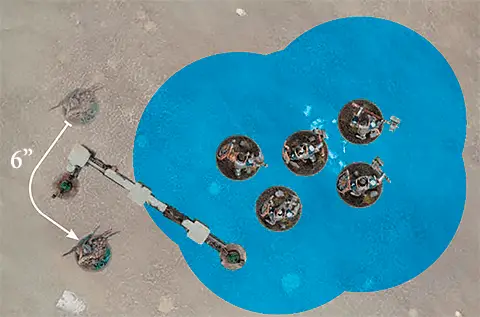
This Grey Seer is using the ‘Normal Move’ ability to change its position on the battlefield. No part of that move can be within the combat range of the Liberators, so the Grey Seer has to stay outside the area marked in blue.

  • When moving a unit, move any number of models in that unit.
  • Each model can turn and pivot, but no part of its base can move farther than the maximum distance.
  • Units can move any distance up to the maximum specified in the ability.
  • Units must end their move in coherency.
3.3 Reinforced Units
When you add a unit to your army roster, you can add it as a reinforced unit. A reinforced unit has twice as many models as its minimum unit size and costs twice as many points. If a unit has a minimum unit size of 1, it cannot be reinforced. In addition, some units with a unit size of more than 1 can not be reinforced. This will be noted on their battle profile.

The OGOR MAWTRIBES and INFANTRY keywords are used in the following Ogor Mawtribes warscrolls:

The non-HERO OGOR MAWTRIBES and INFANTRY keywords are used in the following Ogor Mawtribes warscrolls:

The OGOR MAWTRIBES, INFANTRY and HERO keywords are used in the following Ogor Mawtribes warscrolls:

3.0 Standard Bearers
Units with the STANDARD BEARER keyword have one or more standard bearer models. The number after the STANDARD BEARER keyword indicates the proportion of models in that unit that can be standard bearers. Units with the STANDARD BEARER keyword have the following passive ability:

Passive
STANDARD BEARER: The unit’s standard provides a rallying point in the chaos of battle.

Effect: While this unit contains any standard bearers, add 1 to this unit’s control score.

Cover
Subtract 1 from hit rolls for attacks that target a unit that is behind or wholly on this terrain feature, unless that unit charged this turn or has the FLY keyword.
Impassable
Models cannot move across, be set up on or end moves on any part of this terrain feature.
Those HEROES can join an eligible regiment as a Voice of the Everwinter.

Infantry Hero
• Icebrow Hunter

The non-MAWSEEKERS OGOR MAWTRIBES and INFANTRY keywords are used in the following Ogor Mawtribes warscrolls:

The MAWSEEKERS and WIZARD keywords are used in the following Ogor Mawtribes warscrolls:

Infantry Hero
• Butcher
• Slaughtermaster

The INFANTRY keyword is used in the following Ogor Mawtribes warscrolls: