Bonesplitterz

The Bonesplitterz may look primitive, eschewing even iron and bronze in their contempt for technology, but they remain the foremost hunters of the Realm of Beasts. Of all the orruks, it is they who excel the most in taking down the largest and most dangerous prey – their entire world view is built around it, in fact.

This page contains all of the rules you need to field your Bonesplitterz miniatures on the battlefields of the Mortal Realms, from a host of exciting faction rules to a range of warscrolls. The rules are split into the following sections:


Books

Show History
BookKindEditionLast update
  Bonesplitterz
  BonesplitterzFaction Pack4November 2024
  Legends Warscrolls
  Legends WarscrollsWarscroll4October 2026
  Battle Profiles
  Battle ProfilesRulebook4October 2026
  Rules Updates
  Rules UpdatesRulebook4October 2026
  Regiments of Renown
  Regiments of RenownWarscroll4October 2026
  Grotmas Advent: Regiments of Renown
  Grotmas Advent: Regiments of RenownWarscroll4September 2025
  Kharadron Overlords
  Kharadron OverlordsBattletome4July 2025
  Orruk Warclans
  Orruk WarclansBattletome4December 2024

All Warscrolls
Remove ‘ORRUK’ from the keywords bar.

Faction Rules


Battle Traits

Bonesplitterz armies can use the following abilities:

Passive
SPRING THE TRAP: When the prey is finally corralled, the Bonesplitterz launch themselves forward. The time for kunnin’ is over; now it’s time to get brutal!

Effect: Add 1 to wound rolls for friendly BONESPLITTERZ units that charged in the same turn.

Once Per Battle, Deployment Phase
TAKE DA BAIT: When a group of enemies hurl themselves at a line of grinnin’ Bonesplitterz, too late they realise it was all a trap…

Declare: Pick up to 3 friendly BONESPLITTERZ units to be the targets.

Effect: For the rest of the battle, add 1 to the Attacks characteristic of each target’s melee weapons while it is in combat with an enemy unit that charged in the same turn, and so long as the target has not charged during the battle.

Once Per Battle (Army), Your Hero Phase
BONESPLITTERZ WAAAGH!: Their warpaint blazing with ferocious energy, the Bonesplitterz surge forward under the potent mystical guidance of their shamans.

Declare: Pick each friendly BONESPLITTERZ WIZARD and BONESPLITTERZ PRIEST to be the targets.

Effect: Add 1 to the power level of each target for the rest of the turn. In addition, friendly BONESPLITTERZ units have WARD (5+) for the rest of the turn.
KEYWORDSWAAAGH!

Once Per Turn (Army), Any Charge Phase
MONSTER HUNTERS: Bonesplitterz mobs are adept at bringing down the many ferocious monsters that inhabit the Mortal Realms.

Declare: Pick a friendly BONESPLITTERZ unit in combat with an enemy MONSTER to be the target.

Effect: For the rest of the turn, add 1 to wound rolls for the target’s combat attacks and add 1 to save rolls for the target.

Battle Formations

You can pick 1 of the following battle formations for a Bonesplitterz army. Each battle formation grants a different ability you can use in the battle.

BATTLE PROFILE
NamePoints
Kunnin’ Rukk0
Kop Rukk0
Snaga Rukk0
Brutal Rukk0

Kunnin’ Rukk

Once Per Turn (Army), Your Shooting Phase
SQUINT-EYE TAKTIKS: Whether down to luck, feverishly launched volleys or the simple act of squinting one eye to ‘aim proppa’, this rukk’s Arrowboys have developed a knack for hitting targets where it hurts.

Declare: Pick an enemy unit on the battlefield to be the target.

Effect: For the rest of the turn, hit rolls for shooting attacks made by friendly Savage Orruk Arrowboys units that target the target unit score critical hits on unmodified hit rolls of 5+.


Kop Rukk

Passive
REALM-CHOMPERS: The dokks and bosses of these orruks have devoured so many beast spirits that magical essence is devoured by their warpaint.

Effect: Ward rolls cannot be made for enemy units while they are within the combat range of any friendly BONESPLITTERZ HEROES.


Snaga Rukk

Passive
WE’Z DA BEASTIEST: The Boarboys of the Snaga Rukks love smashing into startled enemies, but having hunted the greatest of beasts, are no strangers themselves to being barrelled into by stampeding monsters.

Effect: Friendly BONESPLITTERZ CAVALRY units have Anti-charge (+1 Rend).


Brutal Rukk

Once Per Battle, Deployment Phase
TIRELESS TRACKERS: The Brutal Rukks move at a relentless pace when hunting prey, appearing suddenly and giving the enemy no time in which to prepare.

Effect: Half the friendly non-HERO BONESPLITTERZ INFANTRY units on the battlefield (rounding up) can immediately use the ‘Normal Move’ ability as if it were your movement phase.

Heroic Traits

Da Beast Wivin

HERO only

BATTLE PROFILE
NamePoints
KILLA INSTINKT0
’ORRIBLE LEER0
ONE WIV’ DA BEAST0
Passive
KILLA INSTINKT: This keen-eyed orruk knows exactly where to strike for maximum effect, even against the gargantuan beasts of the Mortal Realms.

Effect: This unit’s melee weapons have Crit (Mortal).

Passive
’ORRIBLE LEER: The awful grin of this orruk can send chills down the spine of even the most blood-crazed monsters.

Effect: Enemy MONSTERS cannot use RAMPAGE abilities while they are in combat with this unit.

Once Per Battle (Army), Any Hero Phase
ONE WIV’ DA BEAST: This shaman has consumed the spirits of many a beast, strengthening his spiritual connection to the Twin‑Headed God.

Effect: The next time this phase that this unit uses a SPELL ability, instead of making a casting roll for this unit, you can use a value of 6 for the roll that cannot be modified.

Errata

Show
Heroic Traits
Change the timing of the ‘One Wiv’ Da Beast’ ability to ‘Once Per Battle (Army), Any Hero Phase’ and the effect to:
‘The next time this phase that this unit uses a SPELL ability, instead of making a casting roll for this unit, you can use a value of 6 for the roll that cannot be modified.’

Artefacts of Power

Boss Bones and Other Gubbinz

HERO only

BATTLE PROFILE
NamePoints
DOKK JUICE0
GLOWIN’ TATTOOZ0
MONSTA-KILLA CHOMPA0
Passive
DOKK JUICE: A sip of this brew temporarily grants the imbiber the regenerative qualities of a troggoth – if they are able to keep it down for long enough, that is.

Effect: If this unit would be destroyed, before removing it from play, roll a dice. On a 3+, this unit is not destroyed and any remaining damage points inflicted on it have no effect. Then, Heal (1) this unit. This unit cannot use this ability again for the rest of the battle.

Passive
GLOWIN’ TATTOOZ: The beast spirits in these tattoos are so fierce that death itself shies away from them.

Effect: This unit has WARD (4+).

Passive
MONSTA-KILLA CHOMPA: No beast worth its bones can escape the bite of this boss’s chompa.

Effect: This unit has STRIKE-FIRST while it is in combat with an enemy BEAST or MONSTER.

Spell Lore

BATTLE PROFILE
NamePoints
Lore of the Savage Beast0

Lore of the Savage Beast

Your Hero Phase
6
GLOWY GREEN FRENZY: A swirl of green energy coalesces around the boyz, imbuing them with a terrifying ferocity that drives their strikes with primal strength.

Declare: Pick a friendly BONESPLITTERZ WIZARD to cast this spell, pick a visible friendly unit wholly within 12" of them to be the target, then make a casting roll of 2D6.

Effect: Add 1 to the Rend characteristic of the target’s melee weapons until the start of your next turn, including Companion weapons.
KEYWORDSSPELL, UNLIMITED

Your Hero Phase
6
FISTS OF GORK: Great green fists rain down from the sky to pummel the foe.

Declare: Pick a friendly BONESPLITTERZ WIZARD to cast this spell, pick a visible enemy unit within 18" of them to be the target, then make a casting roll of 2D6.

Effect: Roll a dice for each model in the target unit. For each 5+, inflict 1 mortal damage on the target.
KEYWORDSSPELL

Your Hero Phase
6
GORKAMORKA’S WAR CRY: The shaman takes a huge gulp of Waaagh! energy before letting out a world-shaking roar.

Declare: Pick a friendly BONESPLITTERZ WIZARD to cast this spell, pick a visible enemy unit within 18" of them to be the target, then make a casting roll of 2D6.

Effect: Until the start of your next turn, subtract 1 from the number of dice rolled when making charge rolls for the target, to a minimum of 1.
KEYWORDSSPELL

Prayer Lore

BATTLE PROFILE
NamePoints
Prayers of the Living Wilds0

Prayers of the Living Wilds

Your Hero Phase
3
BASHDOKK DANCE: Thumping his feet in a hectic rhythm, the Wardokk gets the boyz ready to have a massive rukk.

Declare: Pick a friendly BONESPLITTERZ PRIEST to chant this prayer, pick a visible friendly BONESPLITTERZ unit wholly within 12" of them to be the target, then make a chanting roll of D6.

Effect: Add 1 to charge rolls and run rolls for the target for the rest of the turn. If the chanting roll was 7+, in addition, for the rest of the turn, the target can use CHARGE abilities even if it used a RUN or RETREAT ability in the same turn.
KEYWORDSPRAYER, UNLIMITED

Your Hero Phase
4
GRIMDOKK DANCE: Stamping his feet hard on the ground, the Wardokk drives Gorky energy into nearby ladz, causing rent flesh to knit together, and broken bones to grind back into place.

Declare: Pick a friendly BONESPLITTERZ PRIEST to chant this prayer, pick a visible friendly BONESPLITTERZ unit wholly within 12" of them to be the target, then make a chanting roll of D6.

Effect: Heal (3) the target unit or return a number of slain models to it with a combined Health characteristic of up to 3. If the chanting roll for this prayer was 9+, instead, Heal (6) the target unit or return a number of slain models to it with a combined Health characteristic of up to 6.
KEYWORDSPRAYER

Your Hero Phase
5
WEIRDOKK DANCE: Dancing to a rhythm only they can hear, this erratic beat causes havoc with enemy mystics.

Declare: Pick a friendly BONESPLITTERZ PRIEST to chant this prayer. Then make a chanting roll of D6.

Effect: Subtract 1 from chanting rolls and casting rolls for enemy PRIESTS and WIZARDS while they are within 18" of the chanter until the start of your next turn.

In addition, if the chanting roll was 11+, enemy Priests within 18" of the chanter each lose D6 ritual points and enemy WIZARDS cannot use UNBIND abilities while they are within 18" of the chanter until the start of your next turn.
KEYWORDSPRAYER

Wound Roll
Roll a dice. If the roll equals or exceeds the attacking weapon’s Wound characteristic, the attack successfully wounds: move on to the next step. If not, the attack fails and the attack sequence ends. Unmodified wound rolls of 1 always fail.
Universal Core Abilities - Charge Phase
Your Charge Phase
CHARGE: With a mighty battle cry, the warriors charge into combat with the enemy.

Declare: Pick a friendly unit that is not in combat and has not used a RUN or RETREAT ability this turn to use this ability. Then, make a charge roll of 2D6.

Effect: That unit can move a distance up to the value of the charge roll. That unit can move through the combat ranges of any enemy units and must end that move within 1/2" of a visible enemy unit. If it does so, the unit using this ability has charged.
KEYWORDSCORE, MOVE, CHARGE

1.0 Wizards and Priests
WIZARDS are special units that can cast spells, and PRIESTS are special units that can chant prayers. Spells and prayers are powerful abilities that can have a dramatic impact on the battle.

The WIZARD keyword is used in the following Bonesplitterz warscrolls:

Cavalry Hero
Infantry Hero
1.1 Power Level
Each WIZARD and PRIEST has a power level shown after the keyword, e.g. WIZARD (2). A WIZARD’s casting power level determines how many Spell abilities they can use per phase. A PRIEST’s chanting power level determines how many PRAYER abilities they can use per phase.
18.1 Ward Saves
Units with the WARD keyword have the ‘Ward Save’ passive ability. The number after the WARD keyword indicates the ward value for the ward save. If a unit had WARD (5+), for example, its ward value would be 5. If a unit has more than one ward save, only the ward save with the lowest value applies to it; the other has no effect.

Passive
WARD SAVE: Whether through their uncanny reflexes, unnatural toughness or a source of mystical protection, these warriors can avoid otherwise lethal attacks.

Effect: In step 1 of the damage sequence (see 18.0), make a ward roll of D6 for each damage point in this unit’s damage pool. If the roll equals or exceeds this unit’s ward value, remove that damage point from the damage pool.

Combat attacks
Combat attacks are made with melee weapons. The target unit(s) must be within the combat range of the attacking model and visible to it. The model must attack with all of the melee weapons it is armed with.
Save Roll
The commander of the target unit rolls a dice, subtracting the attacking weapon’s Rend characteristic from the roll. Unmodified save rolls of 1 always fail. If the roll equals or exceeds the Save characteristic of the target unit, the attack fails and the attack sequence ends. If not, it is a successful attack: move on to the next step.
Hit Roll
Roll a dice. If the roll equals or exceeds the attacking weapon’s Hit characteristic, the attack scores a successful hit: move on to the next step. If not, the attack fails and the attack sequence ends. Unmodified hit rolls of 1 always fail. If an unmodified hit roll for an attack made with a weapon is a 6, that attack is a critical hit.

Critical hits have no effect on their own but often trigger additional effects (see 20.0 Weapon Abilities).
Shooting attacks
Shooting attacks are made with ranged weapons. The target unit(s) must be within a distance equal to the Range characteristic of the weapon being used and visible to the attacking model. Models cannot make shooting attacks if their unit is in combat, unless otherwise specified (see 20.0 Weapon Abilities).
17.2 Mortal Damage
Some abilities inflict mortal damage. If an ability inflicts mortal damage on a unit, add that number of damage points to the unit’s damage pool for that ability (see 18.2 Allocating Damage).
Your Movement Phase
RETREAT: The fighters disengage from combat, though at the cost of lowering their defences.

Declare: Pick a friendly unit that is in combat to use this ability.

Effect: Inflict D3 mortal damage on that unit. That unit can move a distance up to its Move characteristic. That unit can move through the combat ranges of any enemy units but cannot end that move within an enemy unit’s combat range.
KEYWORDSCORE, MOVE, RETREAT
7.0 Combat Range
Each model has a combat range that extends 3" horizontally from its base and any distance vertically from that circle to form a cylinder. The combat range of a unit extends 3" horizontally and any distance vertically from every model in that unit. Units from opposing armies that are within each other’s combat range and that are visible to each other are in combat with each other. When a unit that is not in combat enters the combat range of a visible enemy unit, it moves into combat.
A model is considered to be in combat with an enemy unit if that unit is within the model’s combat range and visible to it’

  • A unit’s combat range extends 3" out from every model in that unit.
  • If any enemy models are within a unit’s combat range and visible to it, that unit is in combat.

FAQ / Errata

FAQ
Q:If a model in base-to-base contact with an enemy model retreats 3" directly away from the enemy model, is it still in combat with that enemy model?
A:
No.
Errata
Addenda: 7.0 Combat Range
Add the following:

‘A model is considered to be in combat with an enemy unit if that unit is within the model’s combat range and visible to it.’

The HERO keyword is used in the following Bonesplitterz warscrolls:

Cavalry Hero
Infantry Hero
• Wardokk

The CAVALRY keyword is used in the following Bonesplitterz warscrolls:

Cavalry Hero
Anti-X (+1 Rend)
Add 1 to this weapon’s Rend characteristic if the target has the keyword after ‘Anti-’ or fulfils the condition after ‘Anti-’. Multiples of this ability are cumulative. For example, if a weapon has both Anti-charge (+1 Rend) and Anti-HERO (+1 Rend), then add 2 to the Rend characteristic of the weapon for attacks that target a HERO that charged in the same turn.

The non-HERO INFANTRY keyword is used in the following Bonesplitterz warscrolls:

7.0 Combat Range
Each model has a combat range that extends 3" horizontally from its base and any distance vertically from that circle to form a cylinder. The combat range of a unit extends 3" horizontally and any distance vertically from every model in that unit. Units from opposing armies that are within each other’s combat range and that are visible to each other are in combat with each other. When a unit that is not in combat enters the combat range of a visible enemy unit, it moves into combat.
A model is considered to be in combat with an enemy unit if that unit is within the model’s combat range and visible to it’

  • A unit’s combat range extends 3" out from every model in that unit.
  • If any enemy models are within a unit’s combat range and visible to it, that unit is in combat.

FAQ / Errata

FAQ
Q:If a model in base-to-base contact with an enemy model retreats 3" directly away from the enemy model, is it still in combat with that enemy model?
A:
No.
Errata
Addenda: 7.0 Combat Range
Add the following:

‘A model is considered to be in combat with an enemy unit if that unit is within the model’s combat range and visible to it.’
Universal Core Abilities - Movement Phase
Your Movement Phase
NORMAL MOVE: The warriors advance across the battlefield.

Declare: Pick a friendly unit that is not in combat to use this ability.

Effect: That unit can move a distance up to its Move characteristic. That unit cannot move into combat during any part of that move.
KEYWORDSCORE, MOVE

Your Movement Phase
RUN: The unit rushes into position.

Declare: Pick a friendly unit that is not in combat to use this ability.

Effect: Make a run roll of D6. That unit can move a distance up to its Move characteristic added to the run roll. That unit cannot move into combat during any part of that move.
KEYWORDSCORE, MOVE, RUN

Your Movement Phase
RETREAT: The fighters disengage from combat, though at the cost of lowering their defences.

Declare: Pick a friendly unit that is in combat to use this ability.

Effect: Inflict D3 mortal damage on that unit. That unit can move a distance up to its Move characteristic. That unit can move through the combat ranges of any enemy units but cannot end that move within an enemy unit’s combat range.
KEYWORDSCORE, MOVE, RETREAT

Crit (Mortal)
If an attack made with this weapon scores a critical hit, that attack inflicts mortal damage on the target unit equal to the Damage characteristic of that weapon and the attack sequence ends.
Your Charge Phase
CHARGE: With a mighty battle cry, the warriors charge into combat with the enemy.

Declare: Pick a friendly unit that is not in combat and has not used a RUN or RETREAT ability this turn to use this ability. Then, make a charge roll of 2D6.

Effect: That unit can move a distance up to the value of the charge roll. That unit can move through the combat ranges of any enemy units and must end that move within 1/2" of a visible enemy unit. If it does so, the unit using this ability has charged.
KEYWORDSCORE, MOVE, CHARGE
18.4 Destroyed Units
When the last model in a unit is slain, the unit is destroyed and all remaining damage points inflicted on that unit have no effect. Similarly, if something causes a unit to be destroyed, all models in the unit are slain and removed from play.
Cover
Subtract 1 from hit rolls for attacks that target a unit that is behind or wholly on this terrain feature, unless that unit charged this turn or has the FLY keyword.
Passive
FLY: Soaring above the battlefield, this unit can reach destinations that are inaccessible to other troops.

Effect: As this unit moves, it ignores other models, terrain features and the combat ranges of enemy units. It cannot end its move in combat unless specified in the ability that allowed it to move. Ignore any vertical distance moved for this unit.
Obscuring
While every model in a non-MONSTER non‐WAR MACHINE unit that does not have the FLY keyword is within 1" of this terrain feature, the following apply:
  • That unit is only visible to enemy units that are within its combat range.
  • The Range characteristic of that unit’s ranged weapons is halved (rounding down to the nearest inch).
Unstable
Models can move across but cannot be set up on or end any type of move on any part of this terrain feature that is more than 1" tall.
1.4.2 Obscuring Terrain
Examples: Wyldwood, fortress wall
Terrain Abilities: Cover, Obscuring, Unstable
6.0 Visibility
A target model is visible to another model (which we’ll call the ‘observing model’) if you can draw a straight line through the air (whether horizontal, diagonal or vertical) from any point on the observing model to any point on the target model that does not intersect any objects except for other models in the observing model’s unit. A target unit is visible to an observing unit if at least 1 model in the target unit is visible to at least 1 model in the observing unit. A model is always considered to be visible to itself.
If a rule or ability requires a target to be both within a given range of and visible to the unit using that ability, or to a model in that unit, both conditions must be met by the same model in the target. You could not, for instance, target a unit where one model is within range but not visible and another model is not in range but is visible.
  • If any part of another model can be seen by an observing model, both the target model and its unit are visible to that observing model.

In some cases, it might not be immediately clear whether a model is visible. If so, stoop down to get a look from behind the observing model. If any part of the other model is visible, even if it is just the tip of a spear, then that model is visible for rules purposes.

FAQ / Errata

FAQ
Q:If a non-FLY INFANTRY HERO (e.g. a Scinari Cathallar) is a Shrine Guardian of a Shrine Luminor, and that Shrine Guardian is within 1" of an obscuring terrain feature, is the Shrine Guardian visible to enemy abilities that target the Shrine Guardian?
A:
Yes.
Errata
6.0 Visibility
Add the following:

‘If a rule or ability requires a target to be both within a given range of and visible to the unit using that ability, or to a model in that unit, both conditions must be met by the same model in the target. You could not, for instance, target a unit where one model is within range but not visible and another model is not in range but is visible.’
16.0 Picking Targets
When declaring an ATTACK ability for a unit, you must pick the target unit(s) for its attacks. The number of attacks each model can make is equal to the Attacks characteristic of the weapons it is using. In most cases, models attack with every weapon on their warscroll (melee weapons for combat attacks, ranged weapons for shooting attacks), though some warscrolls specify that certain models in the unit are armed with special weapons or that the unit must pick between multiple weapons when it attacks.

If the unit is in combat, it can only target units that are in combat with it. If a model has more than one attack, you can split the attacks between eligible targets as you wish.
  • Combat attacks are made with melee weapons. The target unit(s) must be within the combat range of the attacking model and visible to it. The model must attack with all of the melee weapons it is armed with.

  • Shooting attacks are made with ranged weapons. The target unit(s) must be within a distance equal to the Range characteristic of the weapon being used and visible to the attacking model. Models cannot make shooting attacks if their unit is in combat, unless otherwise specified (see 20.0 Weapon Abilities).

FAQ

Q:When making shooting attacks, can all models in the attacking unit shoot even if the target unit is not visible to some of those models?
A:
No, the only models in the attacking unit that can make shooting attacks are those that the target unit is visible to.
Q:When a unit uses a SHOOT ability, does it have to shoot with all of the ranged weapons that it is armed with?
A:
Yes.
Your Shooting Phase
SHOOT: The warriors take aim and unleash a deadly volley.

Declare: Pick a friendly unit that has not used a RUN or RETREAT ability this turn to use this ability. Then, pick one or more enemy units as the target(s) of that unit’s attacks (see 16.0).

Effect: Resolve shooting attacks against the target unit(s).
KEYWORDSCORE, ATTACK, SHOOT
Any Combat Phase
FIGHT: Locked in a deadly melee, the fighters strike out at their foes.

Declare: Pick a friendly unit that is in combat or that charged this turn to use this ability. That unit can make a pile-in move. Then, if that unit is in combat, you must pick one or more enemy units as the target(s) of that unit’s attacks.

Effect: Resolve combat attacks against the target unit(s).
KEYWORDSCORE, ATTACK, FIGHT
Shoot in Combat
This weapon can be used to make shooting attacks even if the attacking unit is in combat.
7.0 Manifestations
There are two types of manifestation: endless spells, which can be summoned by WIZARDS, and invocations, which can be summoned by PRIESTS. Each manifestation has its own warscroll, and the spell or prayer that allows that manifestation to be summoned will be found in the appropriate manifestation lore. No more than 1 friendly WIZARD or PRIEST can attempt to summon the same manifestation per turn, and a friendly WIZARD or PRIEST cannot attempt to summon a friendly manifestation that was removed from play in the same turn.

Manifestations are not units but can be interacted with in similar ways, as explained next:
ALL MANIFESTATIONS
Models can move through them but cannot end a move on them.
Units can finish a charge move within ½" of an enemy manifestation instead of within ½" of an enemy unit.
They can be damaged and destroyed as if they were units but do not count as destroyed units for the purposes of battle tactics and abilities.
They are affected by all enemy abilities as if they were units.
They can use CORE abilities as if they were units, and they can use abilities on their warscroll. Unless specified otherwise, they cannot use and are not affected by any other friendly abilities, and they do not count as units for the purposes of battle tactics or friendly abilities.
They can only use the ‘Shoot’ or ‘Fight’ abilities if they have weapons of the appropriate type.
MANIFESTATIONS WITH A MOVE CHARACTERISTIC OF ‘-’
They cannot move.
They only count as being in combat in the combat phase, and enemy units only count as being in combat with them in the combat phase.
They cannot make shooting attacks with ranged weapons that do not have Shoot in Combat while there is a visible enemy unit within 3" of them.
MANIFESTATIONS WITH A MOVE CHARACTERISTIC GREATER THAN ‘-’
They are treated as if they were units for the purposes of movement, combat range, being in combat and setting up terrain features, other manifestations and other units.

15.3 Pile-in Moves
Some abilities, such as FIGHT abilities, allow a unit to make a short move called a pile-in move to get into a better position for combat. To do so:

If your unit is in combat: Pick an enemy unit your unit is in combat with to be the target of the pile-in move. Each model in your unit can move up to 3". That move can pass through the combat ranges of any enemy units, but each model must end that move no further from the target unit. At the end of the move, your unit must still be in combat with all units that it was in combat with at the start of the move.

If your unit is not in combat: Each model in your unit can move 3" in any direction. That move can pass through and end within the combat ranges of any enemy units.

  • Pile in: move up to 3".
  • If in combat, the unit must end the move closer, or at least as close, to the target enemy unit.
Any Combat Phase
FIGHT: Locked in a deadly melee, the fighters strike out at their foes.

Declare: Pick a friendly unit that is in combat or that charged this turn to use this ability. That unit can make a pile-in move (see 15.3). Then, if that unit is in combat, you must pick one or more enemy units as the target(s) of that unit’s attacks (see 16.0).

Effect: Resolve combat attacks against the target unit(s).
KEYWORDSCORE, ATTACK, FIGHT
1.5 Faction Terrain
Some factions have special terrain features called faction terrain features. Faction terrain features have their own warscrolls. They are not considered to be units, with the following exceptions:
  • In the combat phase, they are treated as if they were units for the purposes of movement, combat range and being in combat.
  • They are affected by all enemy abilities as if they were units.
  • They can be damaged in the same manner as units. However, when they are removed from play, they count as being demolished instead of slain or destroyed (this means that they do not count as destroyed units for the purposes of abilities, scoring battle tactics, etc.).
  • Enemy units can finish a charge move within ½" of a terrain feature that is garrisoned (see 1.5.1). Faction terrain features cannot contest objectives even while they are garrisoned.
  • If a terrain feature has any melee or ranged weapons, it can use the 'Fight' and 'Shoot' CORE abilities as if it were a unit.
  • Terrain features that have a Move characteristic of 0" ('-') cannot move (note that pile-in moves are a type of move).
  • Faction terrain features with a Move characteristic greater than '-' are treated as if they were units in all phases for the purposes of movement, combat range, being in combat and setting up terrain features, other manifestations and other units.

Some faction terrain features allow you to place a unit on them (this will be clearly specified in that terrain feature’s rules). When doing so, instead of measuring range or visibility to and from the unit that is on that terrain feature, measure to and from the terrain feature instead. Unless otherwise specified, units on a faction terrain feature cannot use FIGHT abilities.

If a unit placed on a terrain feature is removed from it (e.g. if an ability removes them from the battlefield), that unit counts as having left that terrain feature and loses any special role or benefits it had as a result of being placed on it.

The Citadel Terrain List shows the number of scenery pieces each terrain feature can consist of. If you are using terrain features that are not included on that list, agree with your opponent before setting up the battlefield how many scenery pieces make up each terrain feature.

Enemy Shooting Phase
1
COVERING FIRE: The warriors unleash a quick volley at a nearby enemy unit before it charges into combat.

Declare: Pick a friendly unit that did not use a RUN ability this turn and that is not in combat to use this ability, then pick the closest enemy unit (to that unit) that can be picked as the target of shooting attacks to be the target. You cannot pick MANIFESTATIONS or faction terrain features as the target of this ability.

Effect: Resolve shooting attacks for the unit using this ability against the target. You must subtract 1 from the hit rolls for those attacks.
KEYWORDSSHOOT, ATTACK
Companion
Unless otherwise specified, attacks made by this weapon are not affected by friendly abilities that modify hit rolls, wound rolls or weapon characteristics, except for those that apply negative modifiers (e.g. ‘Covering Fire’).
Reaction: You declared an ATTACK ability
1
ALL-OUT ATTACK: The warriors fight with frenzied vigour.

Used By: The unit using that ATTACK ability.

Effect: Add 1 to hit rolls for attacks made as part of that ATTACK ability. This also affects weapons that have the Companion weapon ability. For the rest of the turn, subtract 1 from save rolls for the unit using this ability.
5.4 Passive Abilities
Abilities that have the Passive timing are called passive abilities. Passive abilities are not declared. The effects of passive abilities always apply if the conditions of the ability are met, and they must be applied if it is possible to do so.
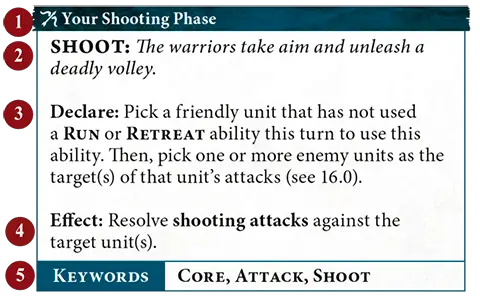
5.0 Abilities
The vast majority of things that units can do in Warhammer Age of Sigmar are called abilities. This is an example of an ability:


1
Timing
2
Name and description
3
Declare instructions
4
Effect
5
Keywords

Ability icons give you an idea what kind of effect the ability has at a glance.

Movement Ability
Offensive Ability
Defensive Ability
Shooting Ability
Rallying Ability
Special Ability
Control Ability


FAQ

Q:Some abilities (e.g. ‘All-out Attack’) have a red timing bar. Can these abilities only be used in the combat phase?
A:
No. The words in the timing bar or, in the case of reactions and passive abilities, the specific wording of the ability will let you know exactly when you can use it; the colour is just there as a play aid. If a phase is not specified, the colour indicates the most common phase it is used in or, if it is used in multiple phases equally, the timing bar is black.
Q:Some abilities have a green timing bar. What does this mean?
A:
The green timing bar is used to indicate defensive abilities, many of which can be used in multiple phases.
Q:Are non-passive abilities such as ‘Burning Wyrdflame’ optional to use?
A:
Yes. You must apply the effects of passive abilities and abilities that state that they must be used if it is possible to do so, but all other abilities are optional to use.
2.0 Spells
The declare step of each spell will tell you to make a casting roll of 2D6. If the roll does not equal or exceed the spell’s casting value (at the top-right corner of the spell), the spell fails and its effect is not resolved.

If the unmodified casting roll includes 2 or more rolls of 1, the spell is miscast: the spell fails, its effect is not resolved, D3 mortal damage is inflicted on the WIZARD that used it, and that WIZARD cannot use any more spells in that phase.

Enemy reactions can only be used if the casting roll equals or exceeds the spell’s casting value. So long as the spell is not unbound (see 4.0), then it is successfully cast: resolve its effect.

EXAMPLE SPELL
Your Hero Phase
6
MYSTIC SHIELD: The caster's allies are bathed in an unearthly glow that protects them from harm.

Declare: Pick a visible friendly unit wholly within 12" of this WIZARD to be the target. Then, make a casting roll of 2D6.

Effect: The target has WARD (6+) this turn.
KEYWORDSSPELL

FAQ

Q:Is mortal damage inflicted by a miscast considered to be ‘mortal damage inflicted by a SPELL ability’ for the purposes of abilities like a Morghast Archai unit’s ‘Ebon-wrought Armour’ ability?
A:
No.
Passive
SEED OF REBIRTH: Should the bearer of this seed ever fall, its rejuvenating energies will grant them new life.

Effect: The first time this unit would be destroyed, before removing it from play, roll a dice. On a 3+, this unit is not destroyed and any remaining damage points inflicted on it have no effect. Then, Heal (D3) this unit.
21.0 Healing
Some abilities allow you to heal a unit. To heal a unit, remove a number of damage points from the unit equal to the number in brackets after ‘Heal’, e.g. Heal (2).

FAQ

Q:If an ability (e.g. ‘Seed of Rebirth’) would allow a unit that would be destroyed to negate all remaining damage points then heal to prevent that unit from being destroyed, and another ability (e.g. ‘Quenching the Flames’) prevents that unit from healing, would that unit still be destroyed?
A:
Yes.
13.1 Fight Abilities
Abilities with the FIGHT keyword follow a different sequence to other abilities. When the players are using
Combat Phase
abilities as described in 13.0, they cannot use FIGHT abilities.

After the players have finished using
Combat Phase
abilities that are not FIGHT abilities, they must alternate picking 1 eligible unit to use a FIGHT ability, starting with the active player. Each unit in combat must use a FIGHT ability if it is able to.

Once a player has no more units that are eligible to use a FIGHT ability, the other player continues to pick units that are eligible to use a FIGHT ability, one after another, until there are no more units that are eligible to use a FIGHT ability.

  • The active player uses Combat Phase abilities that are not FIGHT abilities, then the opponent does the same.
  • Players alternate picking a unit to use a FIGHT ability, starting with the active player.
  • Each unit must use a FIGHT ability if it is able to.

Errata

Addenda: fought
Add the following definition:

‘fought: A unit has fought if it used any FIGHT abilities in the same turn.’
19.0 Strike-first and Strike-last
If there are any STRIKE-FIRST units in combat after any non-FIGHT combat phase abilities have been used, other units cannot be picked to use a FIGHT ability until those units have been picked to use a FIGHT ability. After all those STRIKE-FIRST units have fought, the active player picks the next unit to fight.

If there are any STRIKE-LAST units in combat, they cannot be picked to use a FIGHT ability if there are any units in combat that do not have STRIKE-LAST and have not yet used a FIGHT ability.

If a unit has STRIKE-FIRST and STRIKE-LAST, treat it as if it had neither.

There may be situations when a unit that has STRIKE-FIRST is not in combat at the start of the phase, but because of moves such as pile-in moves, it is ‘pulled into combat’ later in the phase. In such cases, STRIKE-FIRST has no effect on that unit because it was not in combat at the start of the phase.

Abilities that allow a unit to use a FIGHT ability immediately after another unit do not override the STRIKE-FIRST or STRIKE-LAST constraints, so you could not pick a unit with STRIKE-LAST to fight immediately after a unit with STRIKE-FIRST.

FAQ / Errata

FAQ
Q:Can I use an ability that allows a friendly unit that does not have STRIKE-FIRST to fight immediately after a friendly unit that has STRIKE-FIRST if there are one or more enemy units with STRIKE-FIRST that have not yet been picked to fight?
A:
No. As mentioned in the sidebar next to 19.0, abilities that allow a unit to use a FIGHT ability immediately after another unit do not override the STRIKE-FIRST constraints, so you cannot pick a unit that does not have STRIKE-FIRST to fight until all other units that have STRIKE-FIRST have fought.
Q:If a friendly unit is the only unit that has STRIKE-FIRST on the battlefield and it has an ability that allows a friendly unit to fight immediately after it, in what order would units be picked to fight?
A:
If you are the active player, the unit that has STRIKE-FIRST would fight first, then you could use the ability to allow another friendly unit to fight immediately after it, and then you would pick the next unit to fight (i.e. three friendly units would fight back to back). If your opponent is the active player, the unit that has STRIKE-FIRST would fight first, you could still use the ability to allow another friendly unit to fight, and then your opponent would pick the next unit to fight.
Q:In the combat phase, if all eligible non-STRIKE‑LAST units have used a FIGHT ability, which player gets to pick the first STRIKE-LAST unit to fight?
A:
The alternating sequence of picking units to use a FIGHT ability would continue and so the player who did not pick the last non-STRIKE-LAST unit would get to pick the first eligible STRIKE-LAST unit in their army to use a FIGHT ability.
Errata
19.0 STRIKE-FIRST and STRIKE-LAST
In the first sentence, replace ‘at the start of the phase’ with ‘after any non-FIGHT Combat Phase abilities have been used’.
STRIKE-LAST
Remove the following text from STRIKE-LAST:
‘If both players have units with STRIKE-LAST, they alternate fighting with those units after all other eligible units have fought, starting with the active player.’
STRIKE-LAST
In the glossary entry for STRIKE-LAST, remove ‘, starting with the active player’.
Companion
Unless otherwise specified, attacks made by this weapon are not affected by friendly abilities that modify hit rolls, wound rolls or weapon characteristics, except for those that apply negative modifiers (e.g. ‘Covering Fire’).
14.3 Charge Phase
Your Charge Phase
CHARGE: With a mighty battle cry, the warriors charge into combat with the enemy.

Declare: Pick a friendly unit that is not in combat and has not used a RUN or RETREAT ability this turn to use this ability. Then, make a charge roll of 2D6.

Effect: That unit can move a distance up to the value of the charge roll. That unit can move through the combat ranges of any enemy units and must end that move within 1/2" of a visible enemy unit. If it does so, the unit using this ability has charged.
KEYWORDSCORE, MOVE, CHARGE

FAQ

Q:When using the ‘Charge’ ability, does my unit need to end the charge move within 1⁄2" of an enemy unit that was visible to the charging unit at the start of that charge move?
A:
No. It must end the charge move within 1⁄2" of an enemy unit that is visible to the charging unit when it finishes that charge move.
Q:If an ability adds to or subtracts from the number of dice that make up a charge roll, is that a modifier to the charge roll?
A:
No.
3.0 Prayers
The declare step of each prayer will tell you to make a chanting roll of D6. On an unmodified chanting roll of 1, the prayer fails, its effect is not resolved and you must remove D3 ritual points from the PRIEST using the prayer.

Otherwise, pick one of the following:
  • Give a number of ritual points to the PRIEST equal to the chanting roll (ritual points can be accumulated over multiple turns).
  • You can add the PRIEST’s ritual points to the chanting roll. If the chanting roll equals or exceeds the prayer’s chanting value (at the top-right corner of the prayer), it is answered: resolve the effect of the prayer, then reset the PRIEST’s ritual points total to 0.

All PRIESTS know the following prayer:
Your Hero Phase
SACRED RITES: The priest focuses on safely setting their ritual into motion.

Declare: Pick a friendly PRIEST to use this ability, then make a chanting roll of D6. On an unmodified chanting roll of 1, remove 1 ritual point from that PRIEST instead of D3.

Effect: Give a number to ritual points to the PRIEST equal to the unmodified chanting roll and do not reset the PRIEST’s ritual points to 0.
KEYWORDSPRAYER, UNLIMITED


EXAMPLE PRAYER
Once Per Battle, Your Hero Phase
7
RESURRECTION: A fallen hero is brought back from death, their vitality fully restored.

Declare: Make a chanting roll of D6.

Effect: Pick a friendly INFANTRY HERO that has been slain and return them to the battlefield. Set up that HERO wholly within 3" of this PRIEST.
KEYWORDSPRAYER

15.1 Coherency
Any time a unit is set up or ends a move, it must be in a single group. A unit is considered to be in a coherent group if each model in that unit is within coherency range, measured horizontally, of at least 1 other model in that unit (ignore differences in height between the two models).

For the majority of units, coherency range is 1/2", though some units (particularly those with large models with overhanging parts) have a longer coherency range noted on their warscroll for ease of play. While there are 7 or more models in a unit, that unit is considered to be in a coherent group if each model in that unit is within coherency range of at least 2 other models in that unit.

If it is not possible for a unit to end a move in a single coherent group, that move cannot be made.

  • After finishing a move, a unit must be in a single group.
  • Coherency range is 1/2" horizontally.
  • Each model must be within coherency range of a different model from the same unit.
  • While a unit has 7+ models, each model must be in coherency with 2 other models in the unit.
18.3 Slain Models
The commander of a unit must pick which model(s) in the unit are slain. However, after each slain model is removed, the unit must be in a single coherent group (see 15.1). If this is not possible, continue to remove models, one at a time, until the unit is in a single coherent group. You must remove the fewest models possible to make the unit a single coherent group.

FAQ / Errata

FAQ
Q:Do models removed as a result of a unit being out of coherency count as having been slain?
A:
Yes.
Errata
Addenda: 18.3 Slain models
Add the following:

‘You must remove the fewest models possible to make the unit a single coherent group.’
Addenda: removed from play/removed from the battlefield
Add the following definition:

‘removed from play/removed from the battlefield: When a model or unit is removed from the battlefield, it no longer has any effect on the battle, though it can still be relevant for abilities that allow you to return models or replace units.’

Disable Ads


Boosty subscribers may disable ads:
1. Enter e-mail you have used to login on Boosty.
2. Press Get new pin code button (if you don’t have it already)
3. Enter pin code.

Note that login database updated once a day. So, if you are a new booster - try tomorrow. And thank you!
© Vyacheslav Maltsev 2013-2026