Crusade Rules
In the war-torn future of Warhammer 40,000 there are hard-bitten groups of warriors who have battled side by side over countless campaigns. From the close-knit brotherhoods of the Adeptus Astartes to bonded Fire Warriors of the T’au Empire, such companies of fighters have fought together tirelessly, each new battle teaching the skills and knowledge to help them survive the nightmarish battlefields upon which they must wage war. This section explains how you can muster an army for use in your own campaign, and how the units within it can progress and develop between one battle and the next.
Books
| Book | Kind | Edition | Version | Last update |
 Crusade: Leviathan Crusade: Leviathan | ||||
| Crusade: Leviathan | Expansion | 10 | June 2023 | |
Crusade Forces
Order of Battle
An Order of Battle is a list of all the units that you have as part of your Crusade force. It will list each unit’s name, its points value and its Crusade points total. It is also a place to tally notable victories, track vital resources you have acquired and list your Crusade force’s current Supply Limit (see below).Your Order of Battle can consist of any number of units, but you must have a Crusade card for each unit. Once a unit has been added to your Order of Battle, the only way to change its equipped weapons and wargear is to use the Rearm and Resupply Requisition, and the only way to add additional models to it is to use the Fresh Recruits Requisition. Each time you select an army to play with, you will have to select units from your Order of Battle, so it is a good idea to include units with common Faction keywords that can be fielded together to muster an army. You can add new units to your Order of Battle at any time, provided that doing so does not exceed your Crusade force’s Supply Limit. You can also remove units from your Order of Battle at any time, but once you have removed a unit you cannot add it back into your Order of Battle - so any Battle Honours etc. they have acquired are lost. You can find out more about Battle Honours here. Removing a unit from your Order of Battle does not affect your Crusade force’s Supply Limit - therefore removing a unit can potentially leave you with the ability to add a new unit to your Order of Battle.
Supply Limit, Points Values and Supply Used
The combined points values of all the units on your Order of Battle is called your Supply Used; this cannot exceed your Crusade force’s current Supply Limit. When you first start a Crusade force, your Supply Limit is 1000 points. This can be increased by playing more battles, as explained later.Crusade Points
A unit’s Crusade points total is a measure of how many upgrades and bonuses it has gained as part of your Crusade force - when first included in your Crusade force it will typically start at 0, but will increase as the unit gains experience in battle. Make a note of each unit’s Crusade points total on your Order of Battle (see Tyrannic War Crusade Blessings to find out more about how Crusade points affect your battles).Battle Tally, Requisition Points and other Information
Your Order of Battle also has a Battle tally for the number of battles you have played with it, as well as your current number of Requisition points (RP). When you first start a Crusade force, you will start with 5RP. You can find out more about Requisition points here.You can also include any other information you want on your Order of Battle, including notable victories or defeats, any vendettas or grudges you feel your Crusade force would have, or any additional background that you wish to add to your Crusade force or any of the units within it.
- Order of Battle: List of all the units that are part of this Crusade force, and other important information.
- Can add or remove units from your Order of Battle at any time.
- Each unit must have a Crusade card.
- Units cannot be changed once added to your Order of Battle.
- Supply Used: The combined points value of all units in this Crusade force.
- Supply Limit: Starts at 1000 pts. Your Supply Used must not exceed this.
- Battle Tally: Number of battles you have played using this Crusade force.
- Requisition Points: Start at 5RP. Can be spent to use Requisitions.
Blank Order of Battle:

Summoned and Replacement Units
In Warhammer 40,000 there are some rules that are used during a battle to add new units to your Crusade army. These units are only added to your Crusade army for the duration of that battle - they are not added to your Order of Battle.- Summoned and Replacement Units: Units that are added to your Crusade army during the battle, but are not permanently added to your Order of Battle.
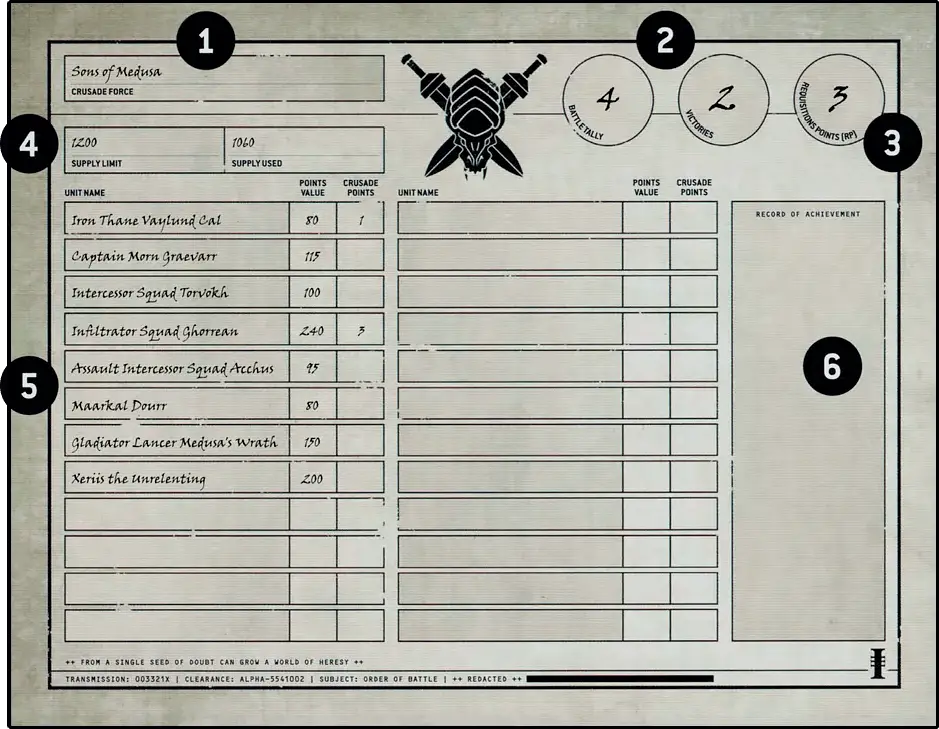
Order of Battle
- When you first create an Order of Battle, write the name of your Crusade force and your name here.
- Record the number of battles you have played using this Crusade force (your Battle tally), and the number of victories it has secured.
- Record the current number of Requisition points (RP) your Crusade force has available.
- Record the current Supply Limit of your Crusade force, as well as the combined points value of all the units in your Crusade force (the Supply Used).
- Your Order of Battle lists all the units in your Crusade force - for easy reference, record each unit’s points value and Crusade points total.
- There is space on an Order of Battle for all kinds of narrative information, such as personal goals, notable victories (or defeats), vendettas and more.
Crusade Force vs Crusade Army
A player’s Crusade force is every model listed on their Order of Battle. A player’s Crusade army is an army selected for use in a single battle from the units in that player’s Crusade force. While, to begin with, a player’s Crusade army may be their entire Crusade force, as that player’s collection of miniatures and their Crusade force grows, this may no longer be the case. For example, if a player’s entire Crusade force is a collection of units with a combined points value of 3000 points, each time that player mustered a Crusade army for a Strike Force battle, they would select 2000 points of units from their Crusade force.- Crusade Force: All the units on a player’s Order of Battle.
- Crusade Army: All the units selected from a player’s Crusade force that will be used in a single battle.
Crusade Cards
- A unique name for that unit.
- Which models and how many of each are in that unit.
- The wargear models in that unit are equipped with.
- Any Enhancements that unit has (see Renowned Heroes).
- The total points value of that unit. This includes the cost of all models, wargear, Enhancements and upgrades that unit has.
- Any selectable keywords that must be chosen when that unit is included in your Crusade force (e.g. <LEGION>, <CHAPTER>).
- Any rules that unit must or can select before the battle.
- Any upgrades that unit has purchased using Requisitions.
- Any Battle Honours or Battle Scars that unit has.
- That unit’s current number of Experience points (XP) (when adding a unit to your Order of Battle, this will be 0).
- That unit’s Combat tallies (when adding a unit to your Order of Battle, these will be 0). This includes a Units Destroyed tally, which is the number of enemy units destroyed by that unit across all games it is included in your Crusade army.
- That unit’s total number of Crusade points (when adding a unit to your Order of Battle, this will be 0). Once you have added a unit to your Order of Battle and created a Crusade card for it, you cannot change the number of models in that unit, the wargear its models are equipped with, or any of the other rules that must be selected when you first create its Crusade card.
Blank Crusade Cards:
Experience Points
When you add a unit to your Order of Battle, it will start with 0 Experience points (XP). Units can gain Experience points as follows:- 1. BATTLE EXPERIENCE 1XP
- 2. DEALERS OF DEATH 1XP
- 3. MARKED FOR GREATNESS 3XP
There are many additional ways in which units can gain Experience points, as described in other publications. Keep track of a unit’s current Experience points total on its Crusade card.
The units listed below never gain Experience points and can never gain Battle Honours. However, they automatically pass any Out of Action tests they are required to take, so never gain Battle Scars. You can find out more about Out of Action tests and Battle Scars here. You can mark the Experience Points section of such units’ Crusade card as ‘N/A’ to remind you.
- EPIC HEROES
- FORTIFICATIONS
- SWARMS
- Summoned and Replacement units
- Experience Points: Units start with 0XP, but gain them by taking part in battles.
- Some units never gain XP.
Combat Tallies
A unit’s Crusade card contains space to record all kinds of battle statistics. Each time a unit takes part in a battle, survives a battle or destroys an enemy unit, make a note on that unit’s Crusade card. Units can gain Experience points from these tallies, as described above.- Combat Tallies: Used to record battle statistics for units during games.
Crusade Card
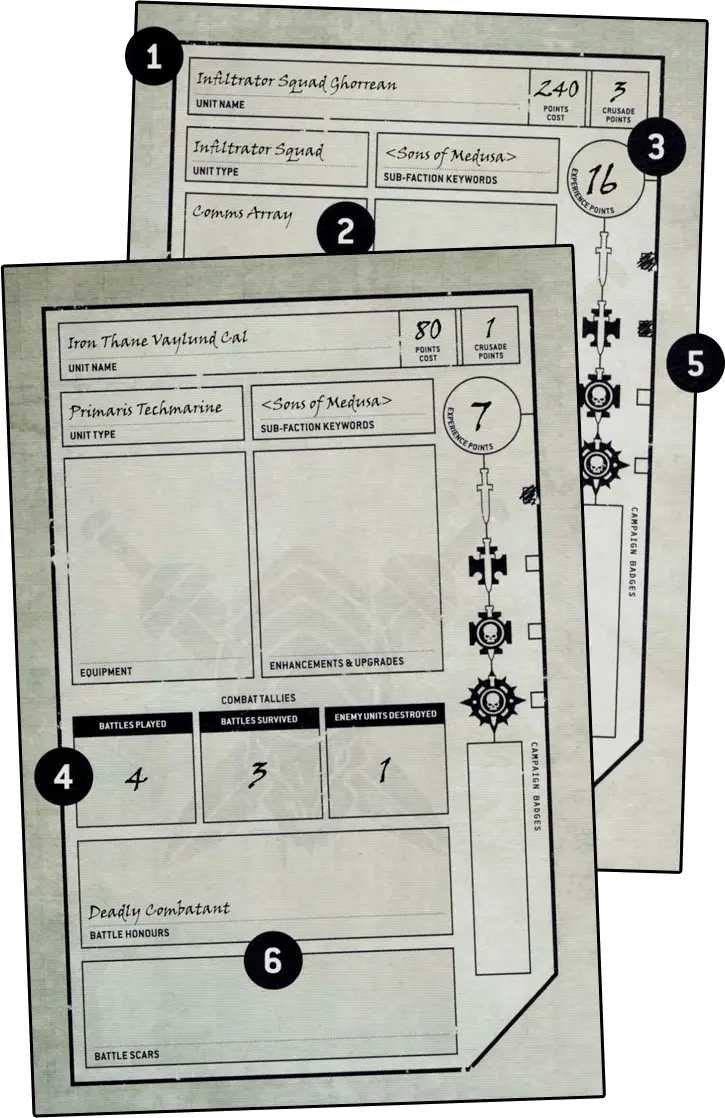
- Each unit in your army should have a unique name.
- A unit’s equipment, upgrades and points value, along with other things you must select.
- The number of Experience and Crusade points a unit has acquired.
- Keep a tally of how many enemy units a unit has destroyed (and how).
- When a unit acquires enough Experience points to be promoted, tick the appropriate box to denote its rank.
- All Battle Honours and Battle Scars that a unit currently has.
Requisitions
As you play more battles, you can gain additional Requisition points, but a Crusade force can never have more than 10 (any additional Requisition points acquired beyond this are lost). Each time you play a battle, you will gain 1RP after that battle has been completed, regardless of the result of the battle itself. Keep track of how many Requisition points you have on your Order of Battle.
- Requisitions cost RP to purchase. You can never have more than 10RP.
- Each battle you play gains you 1RP (win, lose or draw).
Information uncovered by your forces has revealed the growing importance of this war zone and the increasing threat posed by enemies. In response, high command has acceded to your urgent request for reinforcements.
The greatest warriors, most cunning tacticians and seers lead their armies to war possessed of hard-won skills and powerful artefacts that mark them out as legendary commanders.
You can select one Enhancement that unit has access to (if using this Requisition when that unit gains a rank, this is instead of it gaining a Battle Honour). When doing so, that unit has access to any Enhancements described within any Detachment rules that it could use, even though you have not yet started to muster your army and so have not selected any Detachment rules yet.
If the selected Enhancement replaces a weapon that is a Crusade Relic or a weapon upgraded by Weapon Modifications, that Crusade Relic or Weapon Modifications are lost. Recalculate the unit’s points value as a result of gaining this Enhancement and update its Crusade card. You cannot make any changes that would cause you to exceed your Supply Limit.
This Requisition costs 1RP plus 1 additional RP for each other Enhancement that your Order of Battle contains (to a maximum of 3RP).
Occasionally, a group of warriors will climb the ranks across a score of battles, forging a legendary reputation that is known by friend and foe. Such veterans possess skills and honours to rival those of the most glorified heroes.
The changing nature of the war zone and the demands from high command necessitate the opening of arms caches and wargear vaults to ensure your warriors face the enemy with the most effective killing tools.
Amid gore-streaked medicae facilities and clamorous forge-shrines, the damage worked by the foe upon warriors and war engines is undone before they are discharged to seek vengeance.
This Requisition costs 1RP plus 1 additional RP for each Battle Honour that unit has (to a maximum of 5RP).
As wars grind on into deadlier phases, vital missions require larger numbers of troops. Embedding warriors into experienced formations is an intensive and costly exercise, but the victories that result speak for themselves.
This Requisition costs 1RP plus 1 additional RP for every 2 Battle Honours the unit has, rounding up (to a maximum of 4RP).
Ranks and Battle Honours
Only CHARACTER units can gain the Heroic or Legendary ranks. Other units cannot be promoted above the Battle-hardened rank and the maximum number of Experience points they can gain is therefore 30 (any gained beyond this are lost). The Legendary Veterans Requisition is an exception to this rule, enabling a unit without the CHARACTER keyword to gain these ranks.
| ||||||||||||||||||


Battle Traits
Battle Traits are skills or upgrades that units have acquired during their years of warfare, and help to give them a vital edge on the battlefield. Each time a unit gains a Battle Trait, select a Battle Traits table for that unit and either roll one D6 to randomly determine which Battle Trait the unit has gained, or choose the Battle Trait that you think tells the best narrative. A unit can have more than one Battle Trait but it cannot have the same Battle Trait more than once (if a duplicate result is rolled, roll again until a different result is rolled).Battle Traits can be found in many books, including this one (see Tyrannic Wars Battle Traits), as well as in Codexes and other publications. Each time you give a unit a Battle Trait, make a note of it on its Crusade card and increase its Crusade points total accordingly.
Battle Honours
Each time a unit gains a rank, it can gain one Battle Honour. Units can also gain additional Battle Honours by other means (such as by winning certain missions, fulfilling certain Agendas, etc.). Each time a unit gains a Battle Honour, increase its Crusade points total by 1 (if the unit is TITANIC, increase its Crusade points total by 2 instead). Make a note of each Battle Honour a unit has on its Crusade card. A unit can never have more than three Battle Honours unless it is a CHARACTER, in which case it can have up to six Battle Honours. Once the maximum is reached, each time a unit gains a new Battle Honour it must first remove one of its existing Battle Honours.There are several categories of Battle Honours that can be bestowed upon a unit, such as Battle Traits, Weapon Modifications and Crusade Relics. Other categories of Battle Honour may be found in other publications. Each time a unit gains a Battle Honour, you can select from any category.
- Once a unit gains enough XP it will gain a rank.
- Only CHARACTER units can gain the Heroic or Legendary ranks.
- Each time a unit gains a rank, it can gain a Battle Honour.
- There are several categories of Battle Honours, which include:
- Battle Traits: New skills and abilities.
- Weapon Modifications: Upgrade an item of wargear.
- Crusade Relic: Gain a rare and powerful artefact.
- Each time a unit gains a Battle Honour, increase its Crusade points total by 1 (or by 2 if TITANIC).
Weapon Modifications
Weapon Modifications are upgrades made to a warriors armaments that improve their lethality in combat. Each time a unit gains this Battle Honour, you must select one model in that unit (if the unit includes a CHARACTER model or Unit Champion, you must select that model), then you must select one weapon equipped by that model. You cannot select a weapon that has already been upgraded by this Battle Honour and you cannot select a weapon that has already been replaced by an Enhancement or a Crusade Relic - such artefacts cannot be modified.Each time you select a weapon, roll two D6 and consult the table below to randomly determine which two Weapon Modifications it gains (if a duplicate result is rolled, roll both dice again until two different results are rolled), or choose the two different Weapon Modifications that you think tell the best narrative.
|


Crusade Relics
Crusade Relics are rare items of power that your warriors discover as they quest across the galaxy. Only CHARACTER models can gain Crusade Relics. When a model gains a Crusade Relic, simply select the Crusade Relic that you want that model to have. A CHARACTER model can have any number of Crusade Relics, but the same Crusade Relic cannot be included in your Order of Battle more than once. Crusade Relics can be found in many books, including this one (see Crusade Relics).There are three categories of Crusade Relics: Artificer Relics, Antiquity Relics and Legendary Relics. Some categories of Crusade Relic can only be given to CHARACTER models if their unit has achieved a particular rank, as shown in the table below. Unlike other Battle Honours, which increase a unit’s Crusade points total by 1 (or 2 if the CHARACTER unit is TITANIC), each time you give a CHARACTER model a Crusade Relic, you must increase its unit’s Crusade points total by the amount shown in the table below instead. Each time you give a CHARACTER model a Crusade Relic, make a note of it on its Crusade card.
| |||||||||||||||
Out of Action
After a battle, all models from your Crusade army that are destroyed at the end of the battle are restored to your Order of Battle and all wounds they have lost are regained. This represents units replenishing their numbers, wounded warriors returning to the fray and battle tanks being recovered and repaired. The only lasting effects are any Battle Scars the unit acquires, as described below.At the end of each Crusade battle, you must take an Out of Action test for each unit from your Crusade army that is destroyed. To do so, roll one D6. On a 2+, the test is passed and nothing happens. On a 1, the test is failed; you must now choose one of the following options for that unit.
1. Devastating Blow
You can only select this result for units that have one or more Battle Honours. Select one of that unit’s Battle Honours and remove it. Update that unit’s Crusade card and reduce its Crusade points total by 1 (or by 2 if that unit is TITANIC) to account for the lost Battle Honour.2. Battle Scar
That unit gains one Battle Scar (see below). This must be determined before your next battle and that unit’s Crusade card must be updated to reflect any changes.Battle Scars
Each time a unit gains a Battle Scar, either roll one D6 and consult the table below to randomly determine which Battle Scar that unit has gained, or choose the Battle Scar that you think tells the best narrative. A unit can have more than one Battle Scar, but it cannot have the same Battle Scar more than once (if a duplicate result is rolled, roll again until a different result is rolled). A unit cannot have more than three Battle Scars; each time a unit with three Battle Scars fails an Out of Action test, you must select the Devastating Blow result for it. If the unit has no Battle Honours remaining, you must instead remove that unit from your Order of Battle - it is permanently destroyed or otherwise unable to fight any more. Make a note of each Battle Scar a unit has on its Crusade card and subtract 1 from its Crusade points total for each Battle Scar it currently has. Note that this can mean a unit has a negative Crusade points total.- Out of Action: At the end of the battle, if a unit is destroyed, you must take an Out of Action test for it.
- Roll one D6: on a 1, that test is failed. Choose one of the following for that unit:
- Devastating Blow: Lose one Battle Honour.
- Battle Scar: Gain one Battle Scar. Subtract 1 from a unit's Crusade points total for each Battle Scar it currently has.
|
Attached Units
Leaders can merge together with Bodyguard units using the Leader ability. While a Bodyguard unit contains a Leader unit, it is known as an Attached unit and all Battle Honours and Battle Scars that the individual Leader and Bodyguard units have apply to that Attached unit. Rules that only apply if every model in the unit has that rule are an exception to this, and will only apply if both the Leader and Bodyguard units have the same rule. For example, the Infiltrators, Scouts, Deep Strike and Stealth abilities are just some examples of rules that specify ‘If every model in this unit has this ability...’ and as such, they only apply if all the units in an Attached unit (i.e. all the Leader and Bodyguard units that make it up) have that same ability.If an individual Leader or Bodyguard unit is destroyed at the end of the battle, you must make an individual Out of Action test (see above) for that separate unit.
Every individual unit that makes up an Attached unit gains 1XP for Battle Experience after each battle as normal. Each time an Attached unit adds to any Combat tallies for units destroyed or Agendas achieved, and each time an Attached unit gains any bonus XP for any reason (such as for achieving an Agenda or being Marked for Greatness), those tallies and bonus XP can be marked on the Crusade card of, or awarded to either the Leader or the Bodyguard unit (your choice), but not both.
Mustering a Crusade Army
In order to play a Crusade game of Warhammer 40,000, you will need to muster a Crusade army. To do so, follow the sequence below.
1. Select Battle Size
Select one of the following battle sizes; this will determine the total number of points each player will have to spend to build their Crusade army and as a result, how long the battle will last. Note that you will have to select units from your Order of Battle when mustering your Crusade army, therefore it must contain sufficient units for the points specified for your selected battle size.Points are a measure of a unit’s power on the battlefield; the higher a unit’s points value is, the more powerful that unit is. The points values for units are presented in other publications, such as Codexes and the Munitorum Field Manual. You will need to refer to these when building your army.
| ||||||||||||||||||||||
2. Start Your Army Roster
The details of your Crusade army must be recorded on an Army Roster; this can be recorded on the Warhammer 40,000 app, a blank Army Roster or a piece of paper. Players must show their finished Army Roster to their opponent before battle commences.You can download blank Army Roster following this link.
3. Select Army Faction
Note on your Army Roster one Faction keyword to be your Army faction.4. Select Detachment Rules
Note on your Army Roster one set of Detachment rules for your Crusade army. Some Detachment rules list units that you either must or cannot include in your Crusade army; you must conform to all such rules when building your Crusade army.5. Select Units
Select all the units from your Order of Battle that you want to include in your Crusade army. Subtract each unit’s points value from the total permitted for your battle size.You can only include a unit in your Crusade army if:
- That unit has the Faction keyword you chose for your Crusade army in step 3.
- You have enough points remaining.
- Your Crusade army does not already contain three units with the same datasheet name as that unit - or six units with the same datasheet name as that unit if it is a BATTLELINE or DEDICATED TRANSPORT* unit.
Your Crusade army must include at least one CHARACTER unit. Your Crusade army cannot include the same EPIC HERO more than once.
*Every DEDICATED TRANSPORT unit in your Crusade army will need to start the battle with at least one unit embarked inside it, or it will not be able to be deployed for that battle and will instead count as having been destroyed during your first battle round.
6. Select Warlord
Select one CHARACTER model from your Crusade army to be your Warlord - this will be the leader of your Crusade army - and make a note of this on your Army Roster. Your Warlord gains the WARLORD keyword.The changing nature of the war zone and the demands from high command necessitate the opening of arms caches and wargear vaults to ensure your warriors face the enemy with the most effective killing tools.
There are several categories of Battle Honours that can be bestowed upon a unit, such as Battle Traits, Weapon Modifications and Crusade Relics. Other categories of Battle Honour may be found in other publications. Each time a unit gains a Battle Honour, you can select from any category.
- Once a unit gains enough XP it will gain a rank.
- Only CHARACTER units can gain the Heroic or Legendary ranks.
- Each time a unit gains a rank, it can gain a Battle Honour.
- There are several categories of Battle Honours, which include:
- Battle Traits: New skills and abilities.
- Weapon Modifications: Upgrade an item of wargear.
- Crusade Relic: Gain a rare and powerful artefact.
- Each time a unit gains a Battle Honour, increase its Crusade points total by 1 (or by 2 if TITANIC).
As wars grind on into deadlier phases, vital missions require larger numbers of troops. Embedding warriors into experienced formations is an intensive and costly exercise, but the victories that result speak for themselves.
This Requisition costs 1RP plus 1 additional RP for every 2 Battle Honours the unit has, rounding up (to a maximum of 4RP).
- A unit has all the keywords of all models in that unit. A model only has its own keywords.
- If a rule specifies that it applies to a unit with a keyword, it applies to a unit which includes one or more models with that keyword.
- If a rule specifies that it applies to a model with a keyword, it only applies to a model with that keyword.
- If a rule specifies that it applies to ‘non-KEYWORD’ models/units, it only applies to models/units that do not have that keyword. For example, if a rule applies to non-VEHICLE units, it only applies to units that do not have the VEHICLE keyword.
- Some units can contain models that have different keywords. While this is the case, such a unit is considered to have all of the keywords of all of its models, and so is affected by any rule that applies to units with any of those keywords. Remember that attacks are made against units, not models.
- If a rule only applies to models with a specific keyword, then it instead only applies to models in such a unit that have the correct keyword.
- A rule with a comma-separated list of keywords, or a series of keywords separated by slashes (‘/’), or two keywords separated by the word ‘or’ (e.g. ‘an IMMORTALS, DEATHMARKS or LYCHGUARD unit’) refers to a model/unit that has any one of those keywords.
- A rule with multiple adjacent keywords (e.g. ‘an AELDARI GUARDIANS unit’) only refers to a model/unit that has all of those keywords.
- Some older rules use keywords without specifying model or unit: for example, MONSTER/VEHICLE or TRANSPORT. These rules refer to units with those keywords.
- Singular and plural instances of the same keyword function in the same way.
Some rules are linked to one or more keywords. For example, a rule might say that it applies to INFANTRY units. This means it only applies to units that have the INFANTRY keyword. Singular and plural instances of the same keyword function in the same way.
- Using Keywords & Mixed Keywords in Units 02.05.01
The greatest warriors, most cunning tacticians and seers lead their armies to war possessed of hard-won skills and powerful artefacts that mark them out as legendary commanders.
You can select one Enhancement that unit has access to (if using this Requisition when that unit gains a rank, this is instead of it gaining a Battle Honour). When doing so, that unit has access to any Enhancements described within any Detachment rules that it could use, even though you have not yet started to muster your army and so have not selected any Detachment rules yet.
If the selected Enhancement replaces a weapon that is a Crusade Relic or a weapon upgraded by Weapon Modifications, that Crusade Relic or Weapon Modifications are lost. Recalculate the unit’s points value as a result of gaining this Enhancement and update its Crusade card. You cannot make any changes that would cause you to exceed your Supply Limit.
This Requisition costs 1RP plus 1 additional RP for each other Enhancement that your Order of Battle contains (to a maximum of 3RP).
- Combat Tallies: Used to record battle statistics for units during games.
When a model is destroyed, first resolve any rules that are triggered when it is destroyed, then it is removed from the battlefield. If any such rules apply, and if the model was destroyed as the result of an attack, unless otherwise stated, those rules are only resolved and that model is only removed after the attacking unit’s attacks have been resolved. Unless otherwise stated, destroyed models and units cannot use abilities or be selected or targeted by rules.
Some rules only trigger if an enemy model or unit was destroyed by you, or by a model or unit from your army. This means that the enemy model or unit was destroyed by an attack made by a model from your army, or by a player rule you have. Enemy models or units that are destroyed by any other means are not destroyed by you, or by a model or unit from your army.
Occasionally, a group of warriors will climb the ranks across a score of battles, forging a legendary reputation that is known by friend and foe. Such veterans possess skills and honours to rival those of the most glorified heroes.
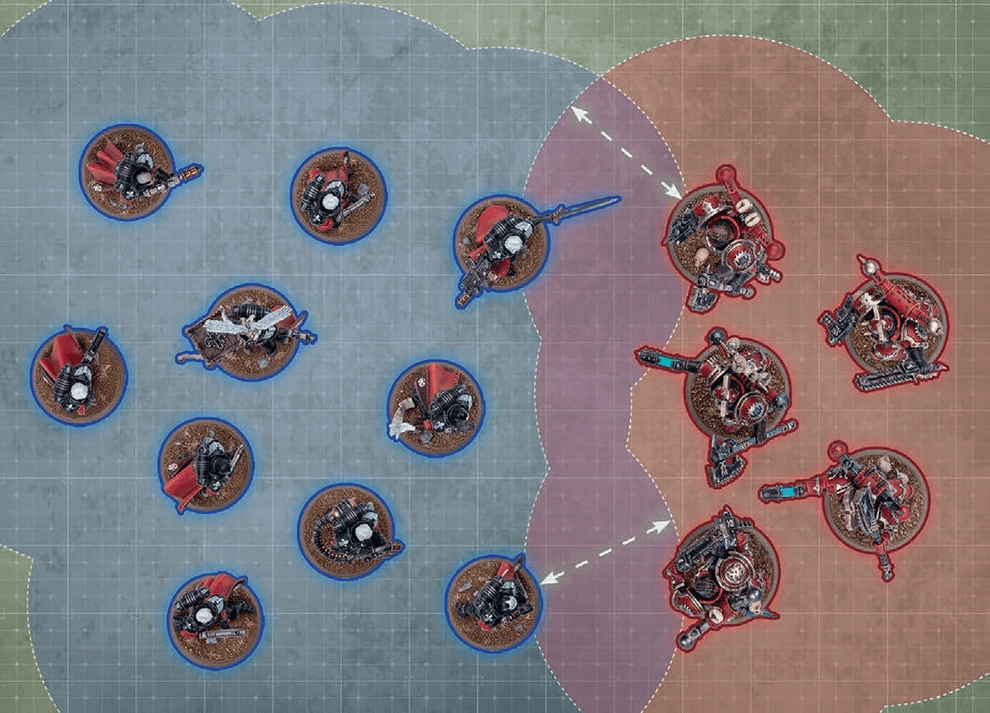
- While a friendly model is within engagement range of one or more enemy models, those models – and the units they belong to – are engaged with each other.
- While a unit contains no engaged models, that unit is unengaged.
EFFECT: Your unit moves as described in Moving (03).
BEFORE MOVING: Make an advance roll by rolling one D6.
AFTER MOVING:
- Your unit must be unengaged.
- Until the end of the turn, unless otherwise stated, your unit is not eligible to declare a charge or start an action.
- If that roll succeeds, that unit does not become battle-shocked.
- If that roll fails, that unit, and each model in it, is battle-shocked.
While a unit is battle-shocked:
- The Objective Control (OC) characteristic of all of its models is modified to ‘-’ (02.02).
- Its controlling player cannot target that unit with stratagems (15).
- It is not eligible to start an action (16), and any action it has started cannot be completed.
- Battlefield Morale 01.07.01
- Battle-shock Test 01.07.02
While a model with an aura ability is on the battlefield, it is always within range of its own aura ability.
A unit can be affected by more than one aura ability at a time, but if a unit is within range of the same aura ability more than once, that aura ability only applies to that unit once.
Many deadly weapons can inflict fatal injuries on any foe, no matter their resilience.
Each time an attack made with a [LETHAL HITS] weapon results in a critical hit, you can choose for that attack to automatically wound the target.
|

Mighty heroes fight at the forefront of battle.
Before the battle, in the Muster Armies step, for each leader and support unit in your army, you can select one friendly bodyguard unit that unit can lead. That unit will then lead that bodyguard unit for the battle and form an attached unit with it.Unless otherwise stated, each bodyguard unit can only have one leader unit and one support unit attached to it.
Many armies employ reconnaissance units who can sit concealed, waiting for the right moment to strike.
During deployment, if every model in a unit has this ability, it can be set up anywhere on the battlefield that is more than 8" horizontally from your opponent’s deployment zone and all enemy units.Scouts form the vanguard of many armies. Unnoticed by the enemy, they range ahead of the main force.
This ability always takes the form Scouts X". In the Resolve Pre-battle Abilities step, if every model in a unit has this ability, you can do one of the following:- If that unit is in strategic reserves, you can set up that unit anywhere that is wholly within your deployment zone.
- If that unit is wholly within your deployment zone, it can make a scout move (see below).
- If that unit is embarked within a DEDICATED TRANSPORT that is wholly within your deployment zone, and if every model embarked within that DEDICATED TRANSPORT has the Scouts ability, that DEDICATED TRANSPORT can make a scout move.
EFFECT: Your unit moves as described in Moving (03).
AFTER MOVING: Your unit must be more than 8" horizontally from all enemy units.
EFFECT: Your unit is set up as described in Set Up (03.02).
BEFORE MOVING: Your unit is set up as described in Set Up (03.02).
WHILE MOVING: Set up your unit wholly within the set-up distance of one or more battlefield edges and more than 8" horizontally from all enemy units.
- Before the Third Battle Round: While doing so, no models can be set up within your opponent’s deployment zone.
There are many ways by which to deploy troops to the field of battle including tunnels, teleportation devices and other esoteric means of transportation.
Each time this unit makes an ingress move (20.04), if every model in this unit has this ability, it can be set up anywhere on the battlefield that is more than 8" horizontally from all enemy units, even if that is within your opponent’s deployment zone.- That model has the INFANTRY/BEASTS/SWARM keyword and is within a terrain area.
- That model is not fully visible to the attacking model due to one or more intervening terrain features and/or one or more intervening obscuring terrain areas (see below).
Each time a ranged attack targets a unit that has the benefit of cover against it, worsen the BS characteristic of that attack by 1.
The stealthiest warriors can evade the attentions, and the bullets, of their foes.
If every model in a unit has this ability, each time a ranged attack targets that unit, that unit has the benefit of cover against that attack (13.08).